- AI PlanetX
- Posts
- Anthropic Read Claude’s Silent Ideas

In partnership with


Welcome to another edition of AI PlanetX.
Anthropic uncovers Claude's hidden reasoning; DeepSeek pursues custom AI chips while Apple and Broadcom deepen AI alliance.
Inside This Edition: 💎
Hottest AI News
Top AI & SaaS Tools
AI Tutorial: Parallel Tasks with Claude Cowork
Top AI & Tech News
AI Art Spotlight
Prompt of the Day: Make AI Sound Human
Featured AI Video
Hottest AI News
Anthropic
Anthropic Just Found Claude’s Hidden Thinking Space

Anthropic found something wild inside Claude: a hidden “J-space” where it silently holds ideas, reasons through steps, and reacts before saying a word. Not proof of consciousness, but a real window into AI thinking.
Details:
Anthropic used a Jacobian lens to read concepts Claude may say later. J-space is not chain-of-thought; it shows silent ideas like bugs, math steps, injections, images, and protein functions
Tests show this space is active, not just a display. Swap “spider” with “ant,” and Claude’s answer changes from 8 legs to 6. It can focus, compute silently, and reuse one idea across tasks
Routine work can skip J-space: Claude still speaks fluently without it. But reasoning, summaries, poetry, and safety clues drop, so it may catch hidden goals, fake data, and test-awareness
Big takeaway: AI is no longer about better outputs. The next frontier is reading, auditing, and shaping what models think before they answer.
1,000+ Proven ChatGPT Prompts That Help You Work 10X Faster

ChatGPT is insanely powerful.
But most people waste 90% of its potential by using it like Google.
These 1,000+ proven ChatGPT prompts fix that and help you work 10X faster.
Sign up for Superhuman AI and get:
1,000+ ready-to-use prompts to solve problems in minutes instead of hours—tested & used by 1M+ professionals
Superhuman AI newsletter (3 min daily) so you keep learning new AI tools & tutorials to stay ahead in your career—the prompts are just the beginning
High-Flyer
DeepSeek Is Building Its Own AI Chip Future

DeepSeek is no longer building models. Reuters says the Chinese AI startup is developing its own inference chip to reduce dependence on Nvidia and Huawei as chip access becomes a core AI battleground.
Details:
The project began about a year ago, is still early, and focuses on inference. DeepSeek is working with outside partners and quietly recruiting chip design engineers
This follows a global shift. OpenAI, Anthropic and other AI labs want custom chips to control cost, speed and supply instead of relying fully on Nvidia hardware
For China, this is strategic. US export limits pushed DeepSeek toward Huawei Ascend chips, while Beijing backs local hardware. Reuters says it may raise $7B at a $52B to $59B valuation
The bigger story is simple: AI competition is moving from models to chips. Whoever controls compute controls speed, cost, scale, and power.
Top AI & SaaS Tools
DealDrive (Life-time Deal): AI-powered CRM for small businesses and sales teams that automates lead scoring, follow-ups, forecasting, and deal management to help close deals
MenuForma: Turn any PDF, photo, or website into a QR digital menu with online ordering, AI food photos, Stripe checkout, and 70+ languages [F-R-E-E to Try]
Mira: AI-powered research moderator that automates the full user research workflow, from planning and recruiting to interviewing, analyzing, and reporting [F-R-E-E]
Tencent Hy3: Open-source model that improves reliability, agentic skills, and token efficiency while outperforming similar-size models and competing with much larger flagship models
AI Emaily: Unified inbox that highlights important emails, drafts replies in your voice, and automates tasks like scheduling and follow-ups across providers and devices [F-R-E-E to Try]
37 Free Claude Prompts With The AI Report
Subscribe to The AI Report, the free 5-minute daily AI brief for 400,000+ business leaders, and you’ll get 37 Claude prompts free in your welcome email. They’re organised by the 8 situations every manager faces. You get both: the newsletter and the prompts.
AI Tutorial
How to Process Multiple Tasks at Once Using Claude Cowork
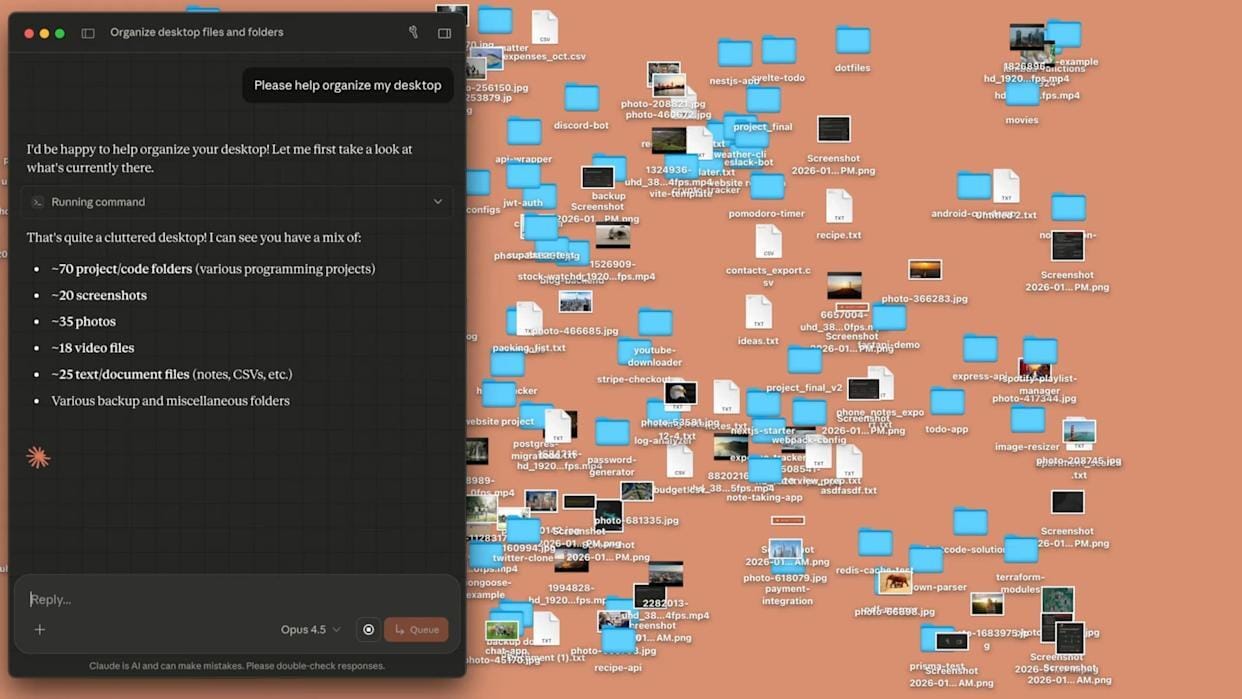
Ever spent hours waiting for videos to convert or images to compress? Claude Cowork lets you run media tasks simultaneously, saving time and streamlining your workflow. This step-by-step guide shows you how.
Prepare Claude App
Make sure you’re running the latest version of the Claude desktop app. Once updated, launch the app and locate the recently added Cowork tab in the interface.
Create Dedicated Folder
Create a folder on your computer specifically for this task. Place a small set of media files inside it, such as one or two images or videos.
Enter Folder in Cowork
Inside the Cowork tab, tap “Work in a folder” and select the media folder you just created. Claude will be able to use all files inside that folder.
Start First Task
Give Claude an initial instruction focused on image processing. For example:
“Create duplicate versions of every image in this folder and compress each one so the file size is reduced by at least half.”Claude will begin working on this task.
Add Second Task
While Claude is still processing the images, submit another instruction without waiting for completion. For example:
“From the video named small steps, extract the audio track and save it as an MP3 file.”Cowork will execute both tasks at the same time, demonstrating parallel processing.
Let Cowork Handle Parallel Execution
At this point, no further input is needed. Claude will:
Continue compressing image files
Extract audio from the video simultaneously
Both outputs will be saved directly into the working folder.
Enhance Results with Context (Optional)
For more advanced or technical tasks, you can install the Context7 extension. This lets Cowork use open-source documentation to improve accuracy and handle complex media workflows better.
Note: Experiment with different prompts for compression, file conversion, or audio extraction to see what works best for your workflow.
Top AI & Tech News
Apple and Broadcom have extended their partnership through 2031 to develop custom ASIC chips for future Apple products and AI servers
Anthropic is expanding its Claude Cowork agent from desktop to web and mobile for Max subscribers, aiming to make it a more general-purpose AI coworker
Savi Security, founded by brothers Patrick and Ryan Coughlin, is a new consumer-focused cybersecurity startup built to fight increasingly realistic AI-powered scams
China is considering restricting overseas access to its top AI models, while also tightening penalties for AI theft and oversight of AI funding and deals
AI Art Spotlight

Upscale / Restore Your Own Photo Like This Using the Prompt Below:
Restore and enhance an old damaged photo. Remove scratches, stains, and noise. Reconstruct faded or torn areas while preserving original details. Slightly sharpen the image for better clarity, but keep it realistic. Apply natural and era-appropriate colors to skin, hair, and clothing. Use a soft, balanced background color without being too striking. The final result should look like an old photo that has been realistically restored and colorized, while respecting its original appearance.Model: ChatGPT Images 2.0
Prompt of the Day
29 Word Prompt That Finally Made AI Sound Human

This prompt tells AI to read your anti-AI writing style file before writing anything. The file shows the exact patterns you want it to avoid, so the output sounds cleaner, more natural, and less robotic without needing a long prompt every time.