- AI PlanetX
- Posts
- Apple vs OpenAI on AI Devices

In partnership with


Welcome to another edition of AI PlanetX.
Apple reportedly developing AI-powered wearable pin; Anthropic codifies Claude’s ethics, while Google acquires Hume AI for Gemini voice tech.
Inside This Edition: 💎
Hottest AI News
Top AI & SaaS Tools
AI Tutorial: Process Multiple Tasks Using Cowork
Top AI & Tech News
AI Art Spotlight
Prompt of the Day: Prompt for Long‑Form Content
Featured AI Video
Weekly Creator Playbooks to Grow on Social
Hottest AI News
Apple
Apple Reportedly Designing Wearable AI Pin To Challenge OpenAI
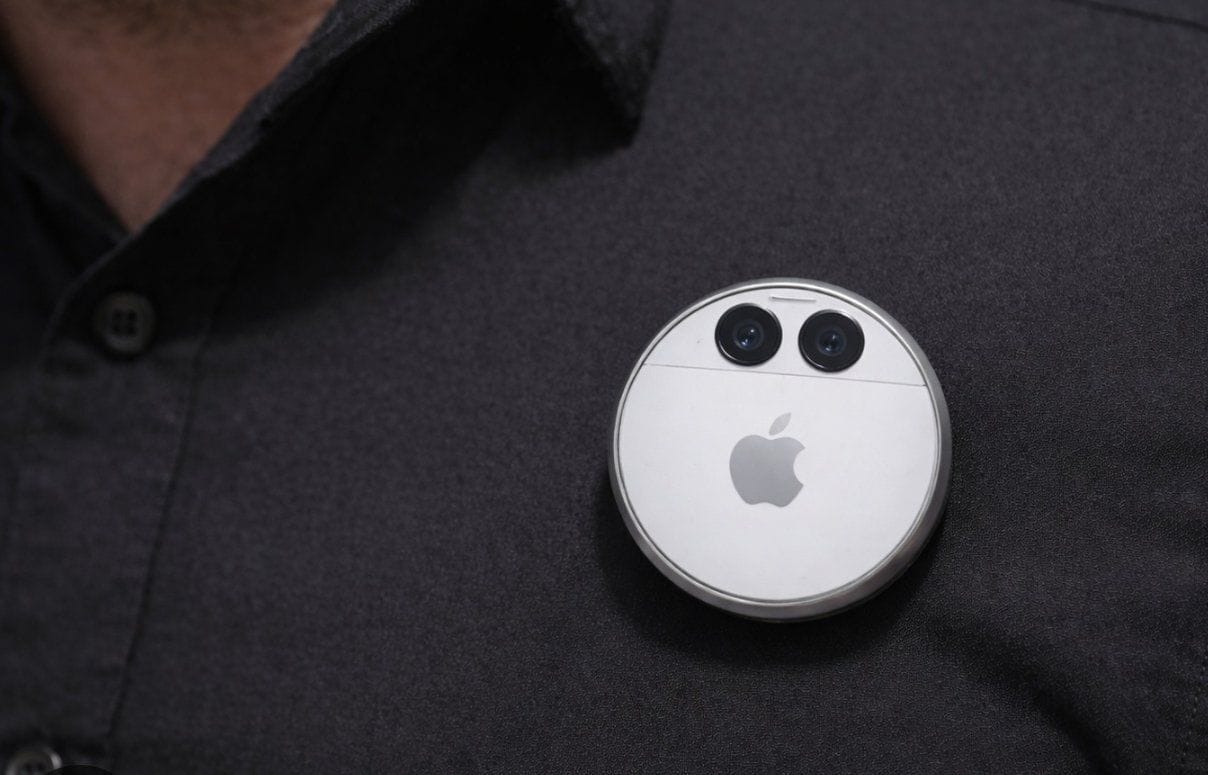
The AI hardware race is heating up, with reports that Apple is developing a listening-enabled wearable to rival OpenAI’s devices, accelerating its AI push despite past failures like the Humane AI Pin.
Details:
Engineers describe the device as a thin, flat circular disc—about the size of a thicker AirTag—made of aluminum and glass, featuring a button, speaker, charging strip, and dual cameras
To rival OpenAI’s Jony Ive–backed hardware and avoid failures like the Humane AI Pin, Apple is reportedly aiming for a 2027 launch with an initial run of 20 million units
The wearable would use three microphones for voice commands and conversation recording, potentially working with smart glasses or as a standalone product—raising fresh questions about privacy
As the tech giant works to overhaul Siri to challenge ChatGPT and Gemini, this hardware push marks a significant pivot toward ambient computing.
Global HR shouldn't require five tools per country

Your company going global shouldn’t mean endless headaches. Deel’s free guide shows you how to unify payroll, onboarding, and compliance across every country you operate in. No more juggling separate systems for the US, Europe, and APAC. No more Slack messages filling gaps. Just one consolidated approach that scales.
Anthropic
Anthropic Instructs Claude Not to Destroy Humanity in “Constitution”
Anthropic is completely overhauling how it aligns its AI, moving from a simple list of guidelines to a massive 57-page "Constitution" designed to instill a sense of "ethical character" and "core identity" directly into the model.
Details:
The model follows a hierarchy of values where safety and ethics outrank helpfulness, and it is encouraged to consider its own moral status, based on Anthropic’s beliefs about psychological security
The document sets hard limits, banning assistance with biological, nuclear, or cyber weapons, and allowing the AI to refuse orders that support illegitimate power—even from Anthropic itself
Although the AI must stay neutral on political topics, Anthropic did not consult external experts or vulnerable groups, arguing the responsibility for defining values rests with the model builders
This marks a significant shift in AI safety, moving away from rigid programming toward creating an autonomous entity capable of understanding the "why" behind its actions.
Top AI & SaaS Tools
FlexiFunnels (Life-time Deal): AI-powered platform that generates complete, conversion-optimized websites, sales funnels, and courses from a single prompt
Runway Gen-4.5 Image-to-Video: Video model for turning images into longer, camera-controlled, narrative-coherent videos with consistent characters
Callum: AI assistant for Google Calendar that schedules and manages multi-person meetings using natural language, shared availability, real-world constraints [F-R-E-E]
Gojiberry: AI outbound tool that finds high‑intent B2B leads, scores them against your ICP, and runs personalized LinkedIn outreach to book demos [F-R-E-E Trial]
Inworld TTS-1.5: Natural, expressive multilingual text-to-speech with real-time performance and <250 ms latency, priced at about $0.005 per minute (claims ~25× cheaper) [F-R-E-E]
Free, private email that puts your privacy first

Proton Mail’s free plan keeps your inbox private and secure—no ads, no data mining. Built by privacy experts, it gives you real protection with no strings attached.
AI Tutorial
How to Process Multiple Tasks at Once Using Claude Cowork
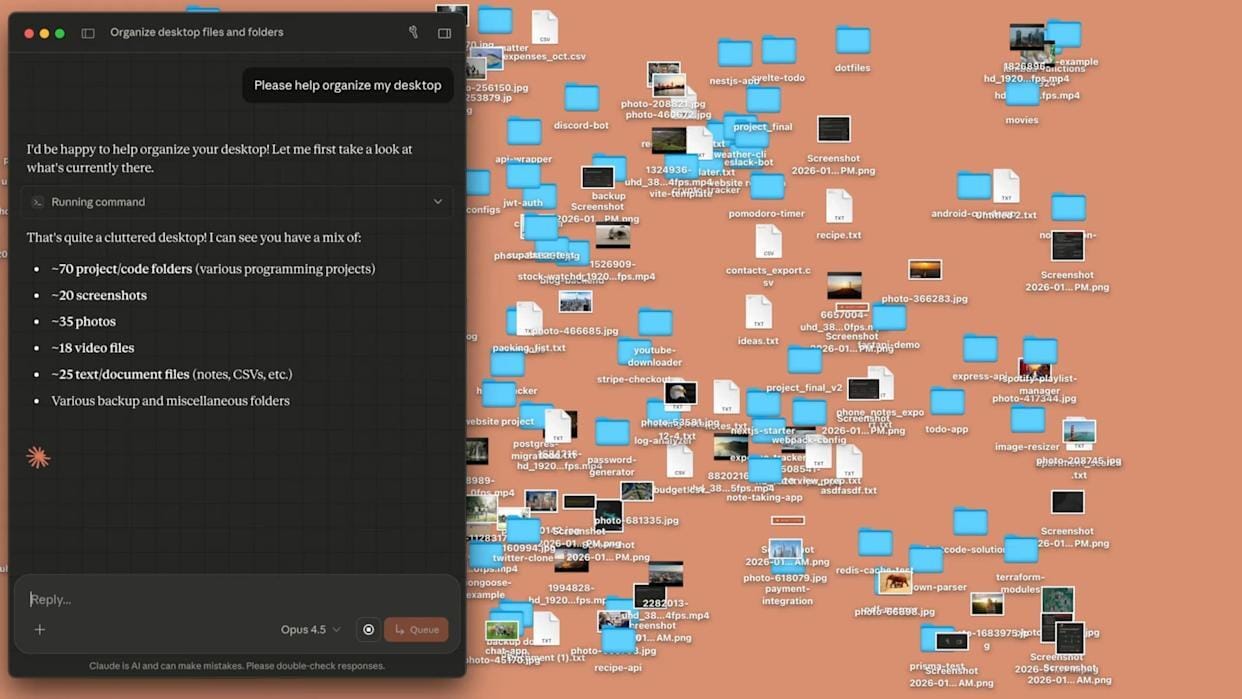
Ever spent hours waiting for videos to convert or images to compress? Claude Cowork lets you run media tasks simultaneously, saving time and streamlining your workflow. This step-by-step guide shows you how.
Prepare Claude App
Make sure you’re running the latest version of the Claude desktop app. Once updated, launch the app and locate the recently added Cowork tab in the interface.
Create Dedicated Folder
Create a folder on your computer specifically for this task. Place a small set of media files inside it, such as one or two images or videos.
Enter Folder in Cowork
Inside the Cowork tab, tap “Work in a folder” and select the media folder you just created. Claude will be able to use all files inside that folder.
Start First Task
Give Claude an initial instruction focused on image processing. For example:
“Create duplicate versions of every image in this folder and compress each one so the file size is reduced by at least half.”Claude will begin working on this task.
Add Second Task
While Claude is still processing the images, submit another instruction without waiting for completion. For example:
“From the video named small steps, extract the audio track and save it as an MP3 file.”Cowork will execute both tasks at the same time, demonstrating parallel processing.
Let Cowork Handle Parallel Execution
At this point, no further input is needed. Claude will:
Continue compressing image files
Extract audio from the video simultaneously
Both outputs will be saved directly into the working folder.
Enhance Results with Context (Optional)
For more advanced or technical tasks, you can install the Context7 extension. This lets Cowork use open-source documentation to improve accuracy and handle complex media workflows better.
Note: Experiment with different prompts for compression, file conversion, or audio extraction to see what works best for your workflow.
Top AI & Tech News
Google hired Hume AI’s CEO Alan Cowen and seven engineers in a licensing/acquihire deal to bring Hume’s voice technology into Gemini
ChatGPT Atlas browser adds support for tab groups and introduces an auto mode that switches between ChatGPT answers and Google Search based on the query
Apple plans a major Siri overhaul that will turn the assistant into a conversational AI chatbot built into iPhone and Mac
Meta's recently formed Meta Superintelligence Labs has delivered its first major internal AI models this month
AI Art Spotlight
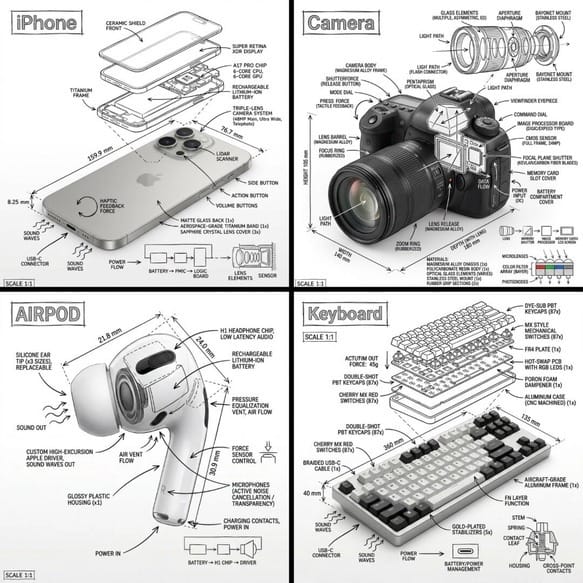
Create Your Own Photo Like This Using the Prompt Below:
Create an infographic image of [OBJECT], combining a realistic photograph or photoreal render of the object with technical annotation overlays placed directly on top.

Use black ink–style line drawings and text (technical pen / architectural sketch look) on a pure white studio background, including:
•Key component labels
•Internal cutaway or exploded-view outlines
•Measurements, dimensions, and scale markers
•Material callouts and quantities
•Arrows indicating function, force, or flow (air, sound, power, pressure)
•Simple schematic or sectional diagrams where relevant

Place the title [OBJECT] inside a hand-drawn technical annotation box in one corner.

Style & layout rules:
•The real object remains clearly visible beneath the annotations
•Annotations feel sketched, technical, and architectural
•Clean composition with balanced negative space
•Educational, museum-exhibit / engineering-manual vibe

Visual style:
Minimal technical illustration aesthetic, black linework over realistic imagery, precise but slightly hand-drawn feel.

Color palette:
White background, black annotation lines and just text. No colors.

Output:
1080×1080, ultra-crisp, social-feed optimized, no watermark.
Model: Nano Banana Pro
Prompt of the Day
Masterclass Prompt for Writing Binge‑Worthy Long‑Form Content
This prompt is designed for faceless YouTube creators who want to produce deep, immersive long-form stories that run 2 to 3 hours without feeling stretched or repetitive. It transforms any single idea or theme into a slow-burn psychological narrative structured across six deliberate phases, from subtle unease to emotional aftermath, ensuring tension builds naturally and viewers stay hooked until the very end.
Featured AI Video
F-R-E-E AI Video Generator on Your PC (No Subscriptions, No Limits)
Want Weekly Creator Playbooks to Grow on Social?

Want to stand out and grow your social presence? Join 10K+ creators getting weekly playbooks to build a creator business that pays.
Unlock $10,000+ Worth of F-R-E-E Creator Blueprints, including: 👇
|
|