- AI PlanetX
- Posts
- Claude Adds Interactive Visuals

In partnership with


Welcome to another edition of AI PlanetX.
Anthropic upgrades Claude with visual tools; xAI builds a coding powerhouse; Microsoft launches Copilot Health.
Inside This Edition: 💎
Hottest AI News
Top AI & SaaS Tools
AI Tutorial: Track Gmail Expenses Automatically
Top AI & Tech News
AI Art Spotlight
Prompt of the Day: Personal Metamorphosis Prompt
Featured AI Video
Course of the Day: Master AI Coding with Cursor
Hottest AI News
Anthropic
Anthropic Adds Powerful Visualization Tools to Claude
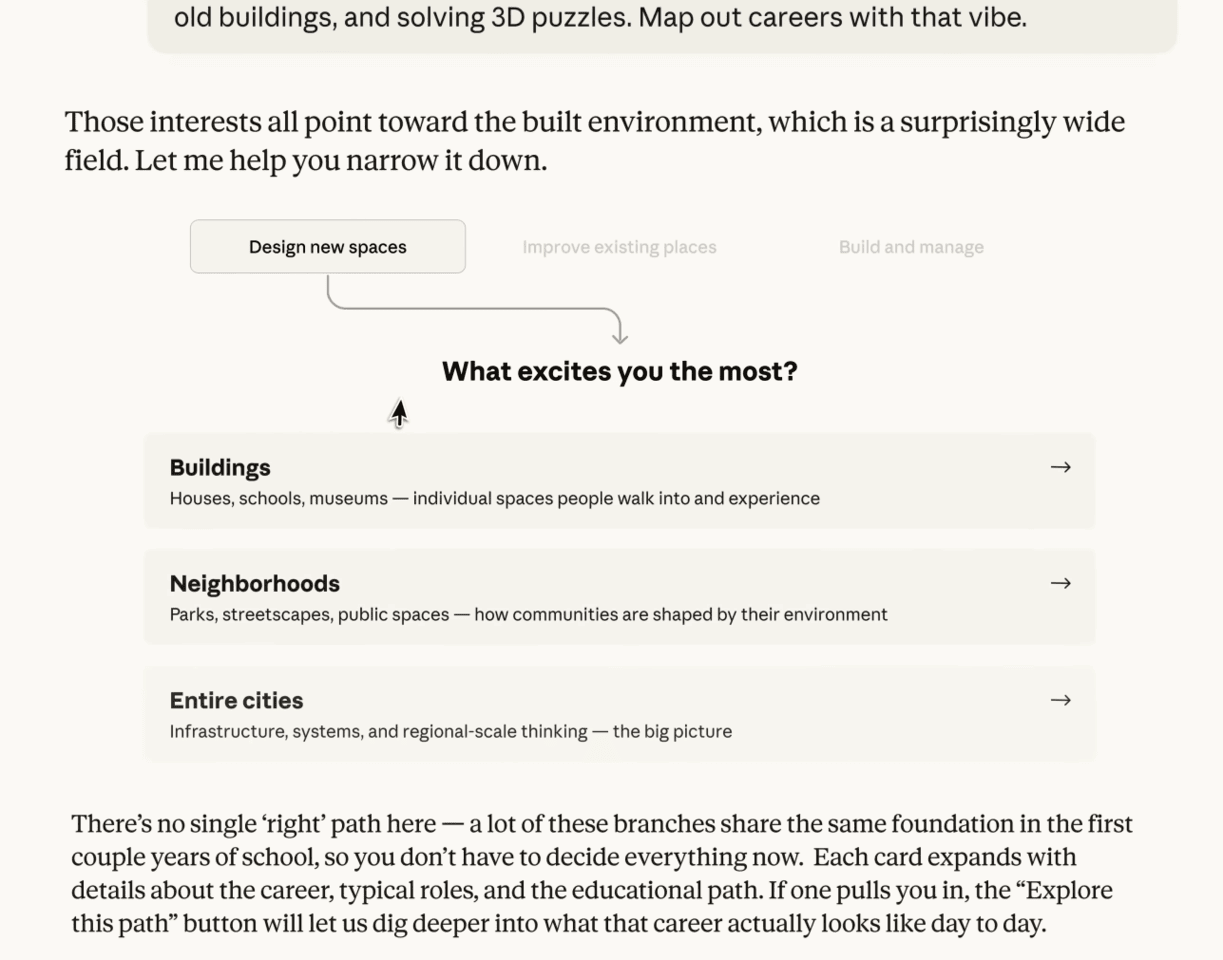
Claude is no longer just text-based. It can also create real-time interactive charts and diagrams inside chat, turning complex data and ideas into clear visuals without leaving the conversation.
Details:
Claude uses a specialized rendering engine to create visuals from prompts or uploaded files. It can generate bar, line, and scatter charts, along with more advanced flowcharts and diagrams
These visuals are interactive, so users can hover over data points, filter categories, and switch between chart types. This makes it easier to explore info and choose the best way to present it
Beyond basic charts, the tool is also strong at structural visualization. It can build detailed diagrams for workflows, system architectures, and conceptual models, making it useful for any task
This update bridges the gap between raw analysis and impactful communication, streamlining the workflow for anyone who needs to synthesize information quickly.
The CRM that saves teams hours every week

HubSpot Smart CRM learns how your team works and adapts to help everyone perform better, which means you'll spot who needs support, celebrate wins instantly, and track what actually matters. The result? You get back hours every week to focus on growth instead of admin work. Start free today.
xAI
xAI Hires Top Cursor Talent To Build A Coding Powerhouse

Elon Musk is making a major move into the dev market. After hiring two key product leaders from Cursor, he has tasked them with building xAI’s flagship coding product to compete in the rapidly growing AI coding space.
Details:
The move addresses a critical strategic void for xAI, which currently stands as a major frontier lab without a specialized coding tool, while the broader AI-coding market has surged past $5 billion valuation
Musk’s pivot reflects a shift in industry priorities; AI labs have recognized that developers are the most valuable and highest-willingness-to-pay user base in the technology sector
By hiring the team behind Cursor, xAI is shifting from pure compute scaling to practical product integration, signaling that winning developers matters more than raw power
This acquisition marks the end of xAI’s experimental phase and the start of an aggressive push toward commercialization.
Top AI & SaaS Tools
TubeOnAI (Life-time Deal): Converts videos, podcasts, PDFs, and articles into ready-to-publish posts, threads, newsletters, or scripts; auto-summarizes and translates into 40+ languages
Kling Motion Control: Kling adds precise motion control with full-body actions, complex movements, detailed hand gestures, and expressive, lip-synced faces [F-R-E-E]
11 AI: Build and customise your own AI voice assistant with unique names and voices, tailored to your needs and style [F-R-E-E]
MiniMax Agent: Hybrid local + cloud platform that lets anyone design, run, and share expert agents with full browser control and batch workflows (alternative to OpenClaw) [F-R-E-E]
Locally Translate App: Offline translation in 50+ languages on iPhone 15 Pro and later, optimized for Apple Silicon and powered by TranslateGemma [F-R-E-E]
Speak your prompts. Get better outputs.

The best AI outputs come from detailed prompts. But typing long, context-rich prompts is slow - so most people don't bother.
Wispr Flow turns your voice into clean, ready-to-paste text. Speak naturally into ChatGPT, Claude, Cursor, or any AI tool and get polished output without editing. Describe edge cases, explain context, walk through your thinking - all at the speed you talk.
Millions of people use Flow to give AI tools 10x more context in half the time. 89% of messages sent with zero edits.
Works system-wide on Mac, Windows, iPhone, and now Android (free and unlimited on Android during launch).
AI Tutorial
How to Track Gmail Expenses Automatically Using Claude

Tracking subscriptions and recurring expenses by hand is slow and error‑prone. This tutorial shows how to use Claude for Chrome to scan Gmail and automatically log expenses in Google Sheets in minutes.
Install Claude for Chrome
Install the Claude Chrome extension, sign in, and ensure it’s enabled. Claude works on browser tabs you explicitly allow.
Set Up Expense
Create a fresh Google Sheet and add the following column headers:
Expense Title
Company
Amount
Date
Renewal Date
Once done, copy the Google Sheet link.
Visit Gmail Inbox
Launch Gmail in a fresh Chrome tab and keep it active. There’s no need to manually search or filter emails—Claude will handle that.
Connect Claude
Tap Extensions → Claude from the Chrome toolbar. Make sure the Gmail tab appears highlighted, confirming Claude can read and interact with it.
Provide Clear Instruction
Use a direct and specific prompt so Claude knows exactly what to do. For example:
Prompt:
“Scan my Gmail inbox for subscription or recurring expense emails from [Month, Year]. Extract the expense name, company, amount, date, and renewal details. Add each item as a new row in [Google Sheet link], and include a total at the bottom.”Allow Claude to Process
Claude will go through your inbox and populate the sheet automatically. This usually takes 10–15 minutes, depending on how many emails you have. If it stops early, just ask it to continue.
Save Prompt for Reuse
To avoid repeating this setup every month, save the prompt as a shortcut:
Type
/in ClaudeChoose Create shortcut
Give it a clear name like “Monthly Expense Tracking”
Note: If your inbox is large, ask Claude to process emails in smaller date ranges for better reliability.
Want the fastest way to get the latest AI updates and tutorials?Follow me on Instagram for quick, practical posts on AI that help you learn new AI tools, AI tips, and workflows in minutes instead of hours. |  |
Top AI & Tech News
Microsoft launched Copilot Health, using medical records and wearables to deliver personalized insights, moving toward “medical superintelligence”
Meta reportedly delayed its next AI model, Avocado, until at least May after it fell short of frontier models in internal tests
Bumble plans to launch “Bee,” an AI assistant that learns user preferences privately and suggests relevant matches
Elon Musk has initiated another round of layoffs and management changes at his AI company xAI after criticizing its coding division’s performance
AI Art Spotlight

Create Your Own Photo Like This Using the Prompt Below:
Restore this old photo into a professional DSLR‑quality portrait with accurate color and fine detail, using an advanced upscaling method comparable to the Canon EOS R6 II. Ensure the restored image looks natural, retains the exact facial features, and has excellent clarity.Model: Nano Banana 2
Prompt of the Day
The Personal Metamorphosis Prompt
This prompt is designed to guide people through meaningful personal change by revealing how inner shifts create lasting external results. It works through natural conversation rather than interrogation, using carefully chosen questions that spark self insight and uncover the gap between who someone is currently and who they are becoming.
Featured AI Video
The Man Behind Every Google AI Tool Showed Me What’s Coming Next
AI Course of the Day
Master AI-Powered Coding with Cursor

Cursor Learn is a hands-on training program designed to help developers master Cursor, the AI-powered coding environment that accelerates software creation. The course walks you through the full Cursor workflow, from setting up the IDE to using AI-assisted editing, fixes, refactoring, code generation, and repository-wide changes.