- AI PlanetX
- Posts
- Gemini 3 Flash Crushes OpenAI

In partnership with


Welcome to another edition of AI PlanetX.
Google’s Gemini 3 Flash tops benchmarks and rivals GPT-5.2; OpenAI unveils the ChatGPT App Store as Luma debuts Ray3 Modify for performance-preserving AI video edits.
Inside This Edition: 💎
Hottest AI News
Top AI & SaaS Tools
AI Tutorial: Turn ChatGPT Projects Into Onboarding System
Top AI & Tech News
AI Art Spotlight
Prompt of the Day: Ultimate Growth Prompt
AI Video Tutorial
Course of the Day: Agentic AI with Andrew Ng (No Paywall)
Hottest AI News
DeepMind
Latest Gemini 3 Flash Dominates Benchmarks and Matches Power of GPT 5.2
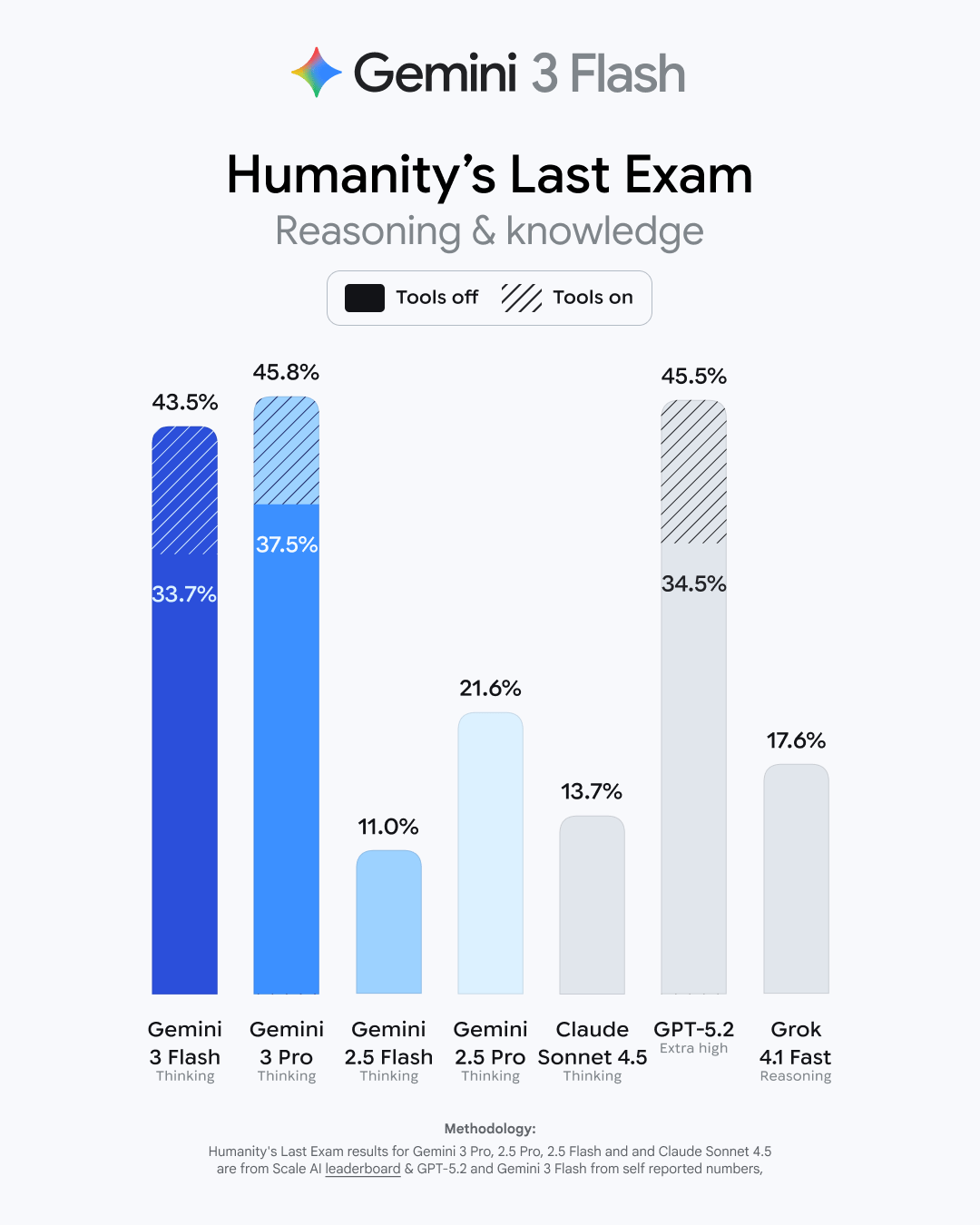
Google launched Gemini 3 Flash as the default model for Gemini and AI Search, delivering major gains in speed and reasoning that let it compete closely with frontier models like GPT-5.2 and Gemini 3 Pro.
Details:
The model rivals top competitors with strong benchmark scores, runs 3 times quicker than Gemini 2.5 Pro, and uses 30% fewer tokens for complex reasoning, helping Google handle over 1 trillion tokens daily
Users can apply it to multimodal tasks like learning from videos, recognizing sketches, turning audio into quizzes, and prototyping apps. Flash answers most queries with better intent understanding
It is deployed across Vertex AI, Gemini Enterprise, and the Antigravity coding tool, and has been adopted by firms such as Figma and JetBrains. The rapid rollout highlights intensifying competition and accelerated model cycles
By combining high-end performance with significant cost efficiencies, Google is aiming to make Gemini 3 Flash the most practical tool for both enterprise and everyday needs.
Unlock ChatGPT’s Full Power at Work
ChatGPT is transforming productivity, but most teams miss its true potential. Subscribe to Mindstream for free and access 5 expert-built resources packed with prompts, workflows, and practical strategies for 2025.
Whether you're crafting content, managing projects, or automating work, this kit helps you save time and get better results every week.
OpenAI
OpenAI Launches the ChatGPT App Store to Create an Everything App
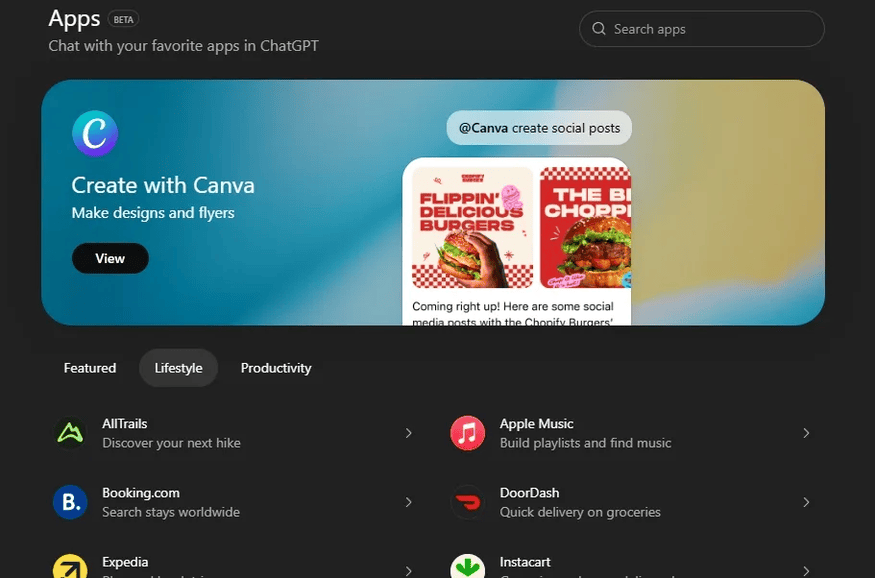
OpenAI is pushing ChatGPT toward an “everything app” with an App Directory and open SDK. This supports Sam Altman’s vision of integrating third-party services directly into ChatGPT for a more interactive experience.
Details:
Developers can use the SDK to build native apps like Apple Music playlist tools or DoorDash recipe-to-cart features, alongside existing integrations such as Zillow and the expanded Spotify app in the UK and EU
Existing data connectors like Google Drive and Dropbox are rebranded as apps, offering file search, deep research, and syncing across F-R-E-E, Plus, Go, and Pro tiers, with some features tied to Memory and user data
OpenAI is still refining its path to profitability, exploring options like digital goods sales and developer incentives while watching how users and developers engage with the ecosystem
This expansion marks a significant shift in how users will interact with AI, moving from simple conversation to direct action across various digital services.
Top AI & SaaS Tools
Fynlo (Life-time Deal): AI bookkeeping app that automates receipt scanning, expense tracking, and invoice creation to save time for accountants, freelancers, and small businesses
YouMind: Personalized AI that saves content from anywhere, learns from your highlights, and converts outputs into editable documents [F-R-E-E]
Wan 2.6: Turns ideas into videos and images with multi-shot storytelling, consistent character casting from reference clips, lip-sync, and natural audio–visual sync [F-R-E-E]
Alai: Context-aware AI that converts ideas into polished, customizable slide decks—so you receive high-quality starting designs [F-R-E-E]
Gobii: Build a ready AI workforce of always-on, web-browsing agents—deploy pretrained workers in minutes for research, ops, and intelligence [F-R-E-E]
Find out why 100K+ engineers read The Code twice a week.

That engineer who always knows what's next? This is their secret.
Here's how you can get ahead too:
Sign up for The Code - tech newsletter read by 100K+ engineers
Get latest tech news, top research papers & resources
Become 10X more valuable
AI Tutorial
How to Turn ChatGPT Projects Into a Self-Guided Onboarding System
Onboarding fresh hires doesn't need to be repetitive. With ChatGPT Projects, you can build a private workspace of SOPs, instructions, and role context that guides hires automatically.
Set up onboarding workspace
Open ChatGPT, enable the sidebar, tap on Projects, and select New project. Give it a clear name so both you and your hire recognize its purpose.
Organize project structure
Inside the Project, create a simple structure before uploading anything. For example:
SOPs
Tools & Credentials
Role Expectations
This makes the workspace easier to navigate and prevents confusion once files and chats begin to accumulate.
Upload training materials
Add relevant SOP documents, workflow PDF files, checklists, and onboarding guides. The goal is to give ChatGPT enough context to answer role-specific questions without overwhelming its memory.
Add custom instructions
Use the Project’s custom instruction area to teach ChatGPT how to behave during onboarding. You can set tone, level of detail, and expectations. Example:
“Explain processes in simple, operational language. Prioritize accuracy over speed. If a policy is unclear from the uploaded SOPs, ask for clarification instead of guessing.”Share onboarding workspace
Invite the hire by entering their email under Share. They'll have entry to every file, chat thread, instruction, and piece of project memory exactly as you set it up.
Sharing ensures:
You don’t have to resend the same files repeatedly
Every hire starts with a consistent onboarding environment
Begin onboarding with prompt
Ask the hire to start with a structured prompt using Voice or Dictation mode. Example:
“I’m joining as a [role title]. My first objective is [goal]. Before giving me any onboarding steps, ask me the top 5 clarifying questions you need to personalize my training.”Continue onboarding flow
As the hire asks questions, ChatGPT will pull from your uploaded SOPs and project memory to give accurate, contextual answers.
Note: Keep each Project focused on one role so the memory stays clean and accurate.
Top AI & Tech News
Luma released Ray3 Modify, an AI model that edits and generates video by preserving original human performance while allowing appearance and scene changes
Adobe faces a proposed class-action lawsuit from author Elizabeth Lyon alleging the company used pirated books
Google is developing TorchTPU to improve compatibility between its Tensor Processing Units (TPUs) and PyTorch, aiming to reduce AI developers' dependence on Nvidia's CUDA
Amazon’s head of AGI, Rohit Prasad, is leaving next year as CEO Andy Jassy reorganizes the company’s advanced-AI efforts
AI Art Spotlight

Create Your Own Photo Like This Using the Prompt Below:
Present a clear, 45° top-down isometric miniature 3D cartoon scene of [CITY], featuring its most iconic landmarks and architectural elements. Use soft, refined textures with realistic PBR materials and gentle, lifelike lighting and shadows. Integrate the current weather conditions directly into the city environment to create an immersive atmospheric mood. Use a clean, minimalistic composition with a soft, solid-colored background. At the top center, place the title "[CITY]" in large, bold text, a prominent weather icon beneath it, then the date (in small text) and temperature (in medium text). All text must be centered with consistent spacing and may subtly overlap the tops of the buildings. Square 1080×1080 dimension.Model: Nano Banana Pro
Prompt of the Day
Ultimate Growth Prompt for Building a Marketing Empire
This prompt gives a compact playbook for quickly growing attention and turning views into revenue across platforms. It focuses on clear repeatable steps: create high-velocity content tailored to each channel, engineer simple funnels that capture and convert attention, use short feedback loops to test and refine headlines and offers, and build community and continuity to lift customer value.
Top AI Video Tutorial
How to Create Product Ads with AI (Full Tutorial!)
AI Course of the Day
Agentic AI with Andrew Ng

Previously paywalled and recently made F-R-E-E, this course teaches building agentic AI systems that plan, execute, and improve tasks, covering four patterns: reflection (self-critique and iteration), tool use (connecting LLMs to databases, APIs, and services), planning (breaking work into adaptable steps), and multi-agent coordination (specialized agents collaborating).