- AI PlanetX
- Posts
- Google Plans More Efficient Gemini Chip

In partnership with


Welcome to another edition of AI PlanetX.
Google improves Gemini efficiency; Trump weighs Chinese AI restrictions; YouTube targets inauthentic AI content.
Inside This Edition: 💎
Hottest AI News
Top AI & SaaS Tools
AI Tutorial: Use AI as Personal Career Guide
Top AI & Tech News
AI Art Spotlight
Prompt of the Day: OpenAI Codex Prompting Guide
Featured AI Video
Hottest AI News
DeepMind
Google Is Building a Custom Chip to Run Gemini More Efficiently

Google is building “Frozen v2,” a server chip that could hardwire parts of Gemini into silicon. The goal: serve far more AI requests with less power as Google faces a growing computing-capacity crunch at scale.
Details:
The chip may arrive as early as 2028 and deliver 6–10× more AI tokens per unit of power than its latest custom chips. Engineers are refining the design and how much Gemini data to hardwire
Frozen will complement, not replace, Google’s TPUs. Co-designing Gemini, software and silicon could cut serving costs, ease data-center pressure and help Google accept more Cloud deals
Gemini 3.5 Pro is delayed after missing goals, especially in coding. Alphabet rose 3.3% in early trading as investors welcomed Google’s push for cheaper AI infrastructure
The AI race is no longer about smarter models. Google believes its model, chips, and cloud can make Gemini more efficient, more affordable, and easier to scale.
200+ Claude Prompts Top Professionals Actually Use at Work

Claude can be your analyst, editor, and strategist.
But most professionals are using it to fix grammar.
These 200+ Claude prompts take it from grammar tool to your most powerful AI work assistant.
Sign up for Superhuman AI and get:
200+ ready-to-use Claude prompts to get real work done in minutes — researched, tested, and used by professionals at Google, Microsoft, and NASA
Superhuman AI newsletter (4 min daily) so you keep learning new AI tools and skills to stay ahead in your career — the prompts are just the beginning
AI Geopolitics
Trump May Block Chinese AI Models From Entering the US Market

Trump administration is quietly reviving plans to restrict advanced Chinese AI models after Kimi’s rise—potentially limiting U.S. availability, chilling open source, and strengthening OpenAI and Anthropic.
Details:
Officials previously weighed Entity List blacklisting, NSA cyber warnings, hosting security and liability rules, plus Commerce supply-chain limits. Pro-innovation officials blocked them
With key skeptics gone, hawks are louder and cyber fears are rising. Without a ban, procurement rules, public pressure and backdoor warnings could push U.S. firms away from Chinese AI
Chinese open models are cheaper and nearly as capable, while U.S. options remain limited. David Sacks says closed labs seek rules that protect their duopoly and crush competition
With Xi emboldened, the AI race is getting tighter. Safety and licensing debates are becoming more real, and Silicon Valley must choose between competition and control.
Top AI & SaaS Tools
OnlineCourseHost (Life-time Deal): User-friendly course platform with AI features, intuitive design, strong onboarding, and flexible marketing and payment options
Paradigm: AI learning platform that turns any learning goal into a personalized, adaptive step-by-step path that evolves with your progress [F-R-E-E to Try]
Deck: Private AI email assistant you CC or forward messages to for summaries, drafts, reminders, and follow-ups without inbox permission [F-R-E-E to Try]
Loova Ads Studio: AI ad creation platform that generates high-converting UGC videos, product commercials, avatar videos, and static creatives
Creed: Lets you store your personal context in a Markdown file so AI assistants can deliver more personalized and consistent responses across different apps [F-R-E-E]
[Webinar] 8 levels of context maturity in AI-native development

AI is in your development workflow. While the token spend shows it, the throughput doesn't. The human is very much still in the loop, and that's a context problem. Join live (FREE) on Jul 23 to see why teams get stuck and how leading teams use a context engine to fix it.
AI Tutorial
How to Use Google’s Career Dreamer as a Personal Career Guide
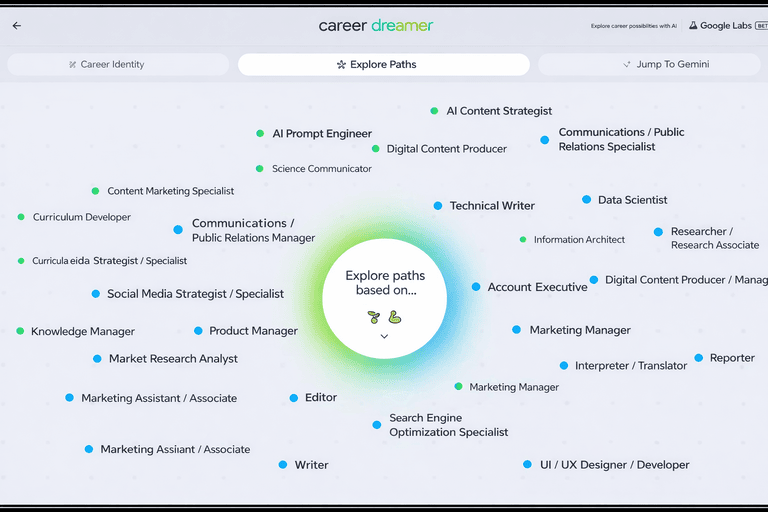
Thinking about a career change but not sure where to begin? This tutorial explains how to use Google’s Career Dreamer to explore different roles, understand why they fit you, and see what you might need to learn next.
Visit Career Dreamer
You can start using Career Dreamer at no cost. No account setup or sign-in is required, so you can explore right away without any friction.
Share Work Background
Begin by entering a current or past role. This gives the tool a basic understanding of where you are coming from professionally and sets the foundation.
Select Responsibilities and Skills
Career Dreamer will generate a list based on your role. You simply choose what applies to you.
This may include:
Key responsibilities you handled
Skills you regularly used
Areas where you have hands-on experience
Generate Career Identity Statement
Once you confirm your selections, Career Dreamer automatically drafts a Career Identity Statement. This acts as a summary of who you are professionally.
Explore Suggested Career Paths
Tap on Explore paths to see a list of potential career options. As you hover over each role, the tool explains why your background is a good match.
You will see:
A short description of the role
How your experience aligns with it
Why it could be a logical next step
Adjust Direction of Results
If you want to shift away from your current path, you can refine your results. Use the Explore paths based on option to control what the AI prioritizes.
Focus on Different Opportunities
You can customize the suggestions by adjusting what the AI considers most important.
For example:
Deselect Experiences and Education
Keep Skills and Interests selected
Use Jump to Gemini for Actions
Finally, Career Dreamer includes a Jump to Gemini tab. This feature helps you take action by assisting with resume building, drafting cover letters, or exploring even more job ideas based on your career goals.
Note: Be honest when selecting skills and responsibilities, even if they feel basic or informal.
Top AI & Tech News
YouTube has updated its monetization rules to more clearly target “inauthentic content,” especially low-quality AI-generated or AI-assisted videos often called “AI slop”
Apple’s trade secrets lawsuit could delay OpenAI’s hardware plans and complicate its IPO, though it is unlikely to stop the company entirely
Moonshot AI has paused Kimi subscriptions after overwhelming demand for Kimi K3 strained capacity, while continuing to serve existing paid users
AMD has launched Helios, its first rack-scale AI system and a direct rival to Nvidia’s hardware, with Microsoft among the early customers
AI Art Spotlight

Create Your Own Photo Like This Using the Prompt Below:
Use the uploaded image as the facial reference for the subject. Keep the face, identity, and key facial features closely matched to the uploaded photo while creating the following scene: Modern editorial collage poster design. The background features four stacked rounded panels filled with black-and-white cinematic portraits of the same stylish young man in different fashion poses. Overlaid in the foreground is a high-quality full-color cutout of the same man wearing a red oversized shirt, black pants, and sunglasses, striking a confident fashion pose. Clean minimal design, no text, no typography, no letters, soft shadows, depth layering, high-contrast lighting, premium magazine aesthetic, ultra-realistic, 8K, professional poster composition.Model: ChatGPT Images 2.0
Prompt of the Day
OpenAI Codex Prompting Guide

This prompting guide is OpenAI’s official guide to using Codex effectively. It covers prompt design, agent behavior, tool usage, code editing, planning, and API best practices to help developers build more reliable and capable coding agents.