- AI PlanetX
- Posts
- Microsoft Goes Full Agentic At Build 2026

In partnership with


Welcome to another edition of AI PlanetX.
Microsoft steps out of OpenAI's shadow with agentic AI; OpenAI lets non-tech employees build apps; Scorsese backs AI filmmaking startup.
Inside This Edition: 💎
Hottest AI News
Top AI & SaaS Tools
AI Tutorial: Create Research Report With AI
Top AI & Tech News
AI Art Spotlight
Prompt of the Day: Stanford’s Guide to Prompting
Featured AI Video
Weekly Growth Playbooks to Scale Smarter
Hottest AI News
Microsoft
Microsoft Escapes OpenAI Shadow With Agentic AI Models And Devices

Microsoft just launched a bold, full-stack agentic AI push at Build 2026, stepping fully out of OpenAI's shadow. By positioning Windows and Microsoft 365 as the control layer for agents, they are redefining the industry.
Details:
Seven MAI models for reasoning, coding, image, voice, and transcription hit Foundry. Lastly, Scout, a proactive OpenClaw-based Autopilot agent, runs continuously in Teams to ready materials
Partnering with Nvidia, Microsoft revealed the Surface Laptop Ultra and Surface RTX Spark Dev Box for local AI. They also teased Project Solara, powering agent-first badges and desk devices
Finally, AI agents directly assisted in designing Majorana 2, a revolutionary quantum chip that demonstrates a 1,000x reliability improvement to speed up timelines for a 2029 usable machine
This massive evolution secures Microsoft's path as an independent AI powerhouse. By owning both the models and the hardware, they run the AI frontier.
50 Excel Hacks That Make Spreadsheets Work For You

Most Excel users waste hours on tasks that take experts minutes. The difference is not talent. It is knowing the right shortcuts.
These 50 Excel hacks from Kenji Explains cover the functions, formulas, and workflows that make spreadsheets work for you instead of against you.
Each one comes with step-by-step instructions and ready-to-use templates. Subscribe to Marketing Against the Grain and get all 50 free.
Here's what you'll get:
Time-saving shortcuts that eliminate the most common formula frustrations
Interface essentials most users never discover on their own
Game-changing functions for data analysis, automation, and visualization
Guided practice template so you can apply every hack immediately
The people who are fast in Excel are not smarter. They just stopped fighting the tool.
Get 50 Excel Hacks free when you subscribe to Marketing Against the Grain today.
OpenAI
OpenAI Codex Update Lets Non Tech Employees Build Web Apps Using Sites

OpenAI is changing Codex from a coding helper into a daily work tool for everyone. With non-tech workers growing three times quicker than devs, this update makes building internal tools and dashboards simple.
Details:
The update adds role-specific plugins for tasks like sales and data analysis, connecting with tools your team already uses. It also includes visual editing to fix mistakes on the spot
The biggest addition is Sites, which lets anyone turn raw ideas into live, interactive web pages and tools. Instead of static files, you get a shared hub your whole team can use
Sites works closely with partner tools like Lovable, Figma, and Replit. This allows employees to create and launch hosted apps from a simple chat without writing code
By shifting focus to everyday office work, Codex is stepping up to become the main operating system for businesses, changing how teams work together.
Top AI & SaaS Tools
GSpeech (Life-time Deal): Convert website text into realistic, translatable audio with 230+ voices, 100+ voice vibes, customizable player, analytics, and easy integrations
Brew: AI-powered email marketing tool that lets users quickly create on-brand emails and automations from plain-English instructions [F-R-E-E to Try]
Holo3.1: Computer-use agents for web, desktop, and mobile with native function calling and efficient local quantized checkpoints
Qwen3.7-Plus: Latest multimodal agent model from Alibaba that combines vision and language into a single versatile system [F-R-E-E]
Hermes Desktop: A native desktop version of Hermes that runs directly on users’ computers with the same agent capabilities
What if your job search ran automatically 24/7?

AIApply is your AI Career Agent working 24/7 to find the best jobs online, tailor every application to your profile, and automatically apply on your behalf so you can spend less time job hunting and more time landing interviews.
AI Tutorial
How to Create a Research Report on Any Topic With AI

Most people use AI for quick answers, but STORM helps you go deeper. It can take one clear topic and turn it into a structured, Wikipedia-style report with sections, sources, and explanations you can actually use.
Launch STORM Research
Go to the STORM Research Platform in your browser. Create an account or log in if you already have one.
Start topic search
Enter your topic in the search bar. Make sure your topic is:
Specific
Clear
Easy to understand without extra context
Example:
Instead of: AI in business
Try: How small businesses use AI tools to automate customer support
Answer questions
STORM may ask follow-up questions before generating the report. For example, it may ask about your writing purpose or what angle you want the article to follow. Choose the answers that match your goal, such as:
Learning the topic
Creating research notes
Preparing a detailed article
Wait for report to generate
After you submit the topic and answers, the platform will start creating the article. This may take a few minutes because STORM gathers information, organizes it, and turns it into a Wikipedia-like report.
Review final article
Once the report is ready, read through it carefully. Check whether the article includes:
Useful explanations
Relevant sources
Updated info
Verify sources
Do not rely on the article blindly. Verify the sources used in the report and check whether the information is accurate, reliable, and recent enough for your topic.
Note: For a more interactive experience, switch to Co-STORM mode to start a roundtable-style conversation around the topic.
Top AI & Tech News
Martin Scorsese is advising AI image startup Black Forest Labs. A video shows the Oscar-winning director using the company’s FLUX model to storyboard an upcoming film
Trump signed an AI security order offering voluntary pre-release government review, classified cyber tests, and federal support for AI vulnerability detection—without mandatory licensing
Uber has introduced latest monthly AI spending caps for employees after exhausting its annual AI budget in just four months
Meta has updated its employee tracking and AI training tool, the “Model Capability Initiative” (MCI), after backlash from staff
Cognition rebranded Windsurf IDE as Devin Desktop, a unified workspace for running local or cloud agents like Codex and Claude
AI Art Spotlight

Create Your Own Photo Like This Using the Prompt Below:
Create an infographic image of [FOOD], combining a real photograph of the landmark with blueprint-style technical annotations and diagrams overlaid on the image. Include the title “FOOD” in a hand-drawn box in the corner. Add white chalk-style sketches showing key structural data, important measurements, material quantities, internal diagrams, load-flow arrows, cross-sections, floor plans, and notable architectural or engineering features. Style: blueprint aesthetic with white line drawings on the photograph, technical/architectural annotation style, educational infographic feel, with the real environment visible behind the annotations. 1:1 dimension.Model: ChatGPT Images 2.0
Prompt of the Day
Stanford’s Guide to Prompting and Reinforcement Learning
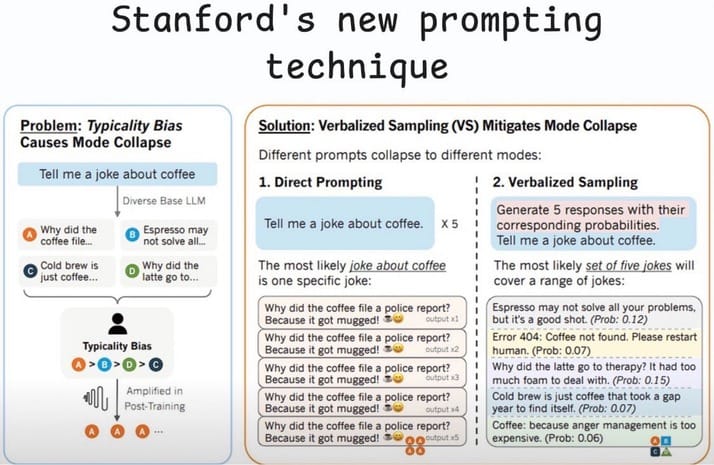
In this video, Jesse Mu, a Member of Technical Staff at Anthropic, explains how pretrained language models are turned into helpful assistants using prompting, instruction fine-tuning, and RLHF guided by human feedback.
Featured AI Video
3 Tools You Need to Create ANY AI Video
Want Weekly Growth Playbooks to Scale Smarter?

Want to find growth trends early? Join weekly playbooks to improve ads, content, tools, and growth decisions with practical steps.
Unlock $10,000+ Worth of F-R-E-E Growth Blueprints, including: 👇
|
|