- AI PlanetX
- Posts
- OpenAI Brings Codex App to Mac

In partnership with


Welcome to another edition of AI PlanetX.
OpenAI brings Codex to Mac; SpaceX acquires xAI for solar-powered AI data centers in space, while China open-sources a high-speed agentic model.
Inside This Edition: 💎
Hottest AI News
Top AI & SaaS Tools
AI Tutorial: Build Complete Course for Any Tool
Top AI & Tech News
AI Art Spotlight
Prompt of the Day: Prompt That Teaches Prompt Engineering
Featured AI Video
Weekly Creator Playbooks to Grow on Social
Hottest AI News
OpenAI
OpenAI Brings Codex Coding App to Mac With Advanced Multiple‑Agent Abilities

OpenAI has officially released Codex as a dedicated macOS app, evolving beyond simple code generation into a sophisticated multi-agent system capable of managing complex development workflows.
Details:
The software can run multiple AI assistants at once, each with a different role. It proved this by building a Mario Kart style racing game, generating visuals, writing the web code, and QA testing by playing
To keep work organized, it includes a Skills area for saving team instructions and resources. It also has Automations for repeat tasks like daily issue triage, bug checks, and CI failure summaries
This release targets the same agent workflow space as tools like Cursor. OpenAI is offering limited time availability for ChatGPT F-R-E-E and Go users
This launch shifts users from writing scripts to supervising multiple AI agents that build software in parallel.
200+ AI Side Hustles to Start Right Now
While you were debating if AI would take your job, other people started using it to print money. Seriously.
That's not hyperbole. People are literally using ChatGPT to write Etsy descriptions that convert 3x better. Claude to build entire SaaS products without coding. Midjourney to create designs clients pay thousands for.
The Hustle found 200+ ways regular humans are turning AI into income. Subscribe to The Hustle for the full guide and unlock daily business intel that's actually interesting.
xAI
SpaceX Acquires xAI to Build Solar Powered AI Data Centers in Space
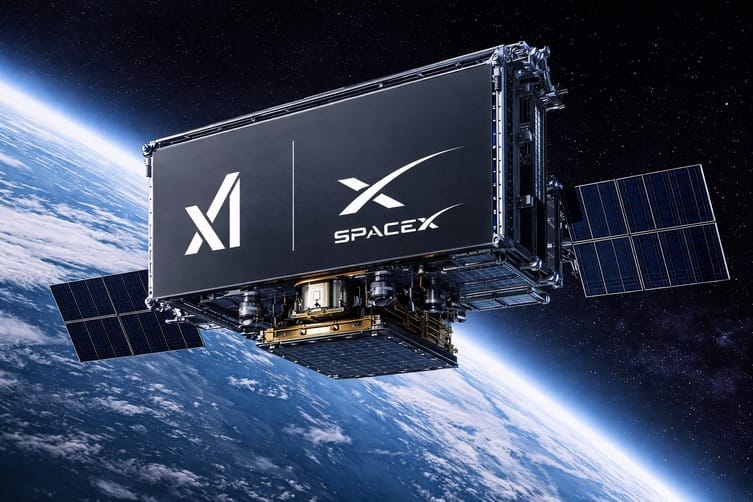
Elon Musk announced a $1.25 trillion all-stock merger where SpaceX acquires xAI, creating a vertically integrated entity aimed at moving much of humanity’s AI computing off Earth to safeguard the future of AGI.
Details:
The acquisition’s main goal is to escape Earth’s overloaded power grids by moving data centers into orbit, where constant, uninterrupted solar energy can support xAI’s training models
SpaceX plans to use its Starship fleet to deploy these massive compute clusters, taking advantage of space’s natural cold to ease the thermal limits that constrain ground-based supercomputers
Together, this move consolidates Grok’s generative capabilities, X’s real-time data, and SpaceX’s infrastructure into a single ecosystem, a step analysts see as a lead-in to a potential record-setting IPO this year
Despite major technical challenges of running server farms in zero gravity, Musk says the “Space Merger” is the best way to scale intelligence without overloading Earth’s energy systems.
Top AI & SaaS Tools
TextLink (Life-time Deal): An affordable SMS marketing service that lets you send bulk messages using your own devices and SIM cards
Grok Imagine 1.0: Quicker, cheaper AI tool for creating and editing up to 10s 720p videos with better audio, motion, and a unified API [F-R-E-E]
Eleven v3: ElevenLabs released this for commercial use, improving stability and accuracy, with fewer errors in numbers, symbols, and technical notation [F-R-E-E]
GLM-OCR: OCR model achieving state-of-the-art performance on complex document understanding tasks [F-R-E-E]
Lovart Skills: Packaged design workflows that let users pick a creation type and have an agent automatically execute the full process from idea to visuals
AI Tutorial
How to Build a Complete Course for Any Tool in Record Time

Most people waste weeks jumping between random tutorials, outdated guides, and incomplete documentation when learning a tool for the first time. This tutorial shows a quicker, smarter way to build a complete course for any tool in a short amount of time.
Define Learning Objective
Start by deciding exactly what you want to achieve with the tool.
Be specific about your outcome so your research stays focused and efficient.
Let Gemini Do Research
Ask Gemini to perform a deep search for the best educational YouTube content about the tool.
Use a prompt like:
“Find the most practical and beginner-friendly YouTube tutorials, walkthroughs, and full courses about [Tool Name]. Focus on real-world usage and current versions.”Collect Knowledge Base
Go to the company’s website and save all official learning material:
Documentation
Tutorials and guides
API references (if applicable)
Product blogs and updates
Extract Real-World User Knowledge
Search relevant subreddits, forums, and communities related to the tool.
Look for experienced users sharing workflows, advanced setups, and practical use cases that go beyond basic tutorials.
Build Knowledge Hub
Upload all collected material into NotebookLM so everything lives in one place.
You will then have a searchable, organized knowledge base built from the best resources on the internet.
Generate Full Course Curriculum
Ask NotebookLM to build a complete learning path from beginner to expert:
Step-by-step lessons
Real-world projects
Practical workflows
Hands-on exercises
This turns scattered information into a structured course.
Learn Through Personalized System
You should have a complete curriculum built specifically for you.
It follows real workflows, includes practical projects, and reflects best practices from power users — not generic theory.
Note: Don’t try to consume everything at once. Let the curriculum guide your learning path and follow it step by step.
Top AI & Tech News
Chinese AI lab StepFun open-sourced Step-3.5-Flash, a high‑speed and efficient model with strong agentic and reasoning skills
A coordinated raid on X’s Paris office by the Paris prosecutor’s cybercrime unit, Europol, and French police took place as part of an ongoing probe that include xAI’s Grok
Mozilla will add an AI controls section to Firefox starting in version 148 that lets users block all generative AI features or manage them individually
Amazon launched an open beta of its MCP Server for Amazon Ads, letting advertisers and ad‑tech partners connect AI agents to Amazon’s ad systems
AI Art Spotlight

Create Your Own Photo Like This Using the Prompt Below:
[product], centered top down flat lay, surrounded by [ingredients], fresh slices and whole pieces, glossy wet look, water splash frozen mid motion around the product, dewy droplets on label and surface, warm beige seamless background, soft directional sunlight, crisp realistic shadow, high end skincare advertising, ultra realistic macro product photography, 100mm lens look, f/8 sharp focus, clean composition, no extra text, 8k, 1:1Model: Nano Banana Pro
Prompt of the Day
Prompt That Teaches Prompt Engineering
Paste this prompt into a fresh Claude Project to turn Claude into a prompt engineering mentor. It teaches how to structure prompts with clear roles, goals, constraints, and output formats, then guides you through practice on real use cases, before/after comparisons, and debugging why outputs fail.
Featured AI Video
OpenClaw's Creator Runs His Life With AI in Just 40 Minutes
Want Weekly Creator Playbooks to Grow on Social?

Want to stand out and grow your social presence? Join 10K+ creators getting weekly playbooks to build a creator business that pays.
Unlock $10,000+ Worth of F-R-E-E Creator Blueprints, including: 👇
|
|