- AI PlanetX
- Posts
- OpenAI Device Coming This Year

In partnership with


Welcome to another edition of AI PlanetX.
OpenAI targets its first hardware debut in 2026; Elon Musk fires an xAI engineer after a candid interview, while Claude Code goes viral and AI “selfware” spooks software stocks.
Inside This Edition: 💎
Hottest AI News
Top AI & SaaS Tools
AI Tutorial: Use AI as Personal Career Guide
Top AI & Tech News
AI Art Spotlight
Prompt of the Day: Find Your Best AI Model
AI Video Tutorial
Weekly Creator Playbooks to Grow on Social
Hottest AI News
OpenAI
OpenAI Targets Second Half of 2026 for First Hardware Debut

OpenAI is officially moving into the hardware business, with executives confirming at Davos that the company is on track to debut its first-ever physical device in the second half of 2026.
Details:
The release is on track for late 2026, though executives noted that while this is the most likely timeline, the actual launch will depend on how development advances throughout the year
The device is being built with former Apple design leader Jony Ive. It’s rumored to be a screenless, wearable prototype. CEO Sam Altman has described it as “peaceful” and shockingly simple compared to phones
Qualcomm CEO suggested his company is working with OpenAI on the project. It will launch into a competitive market. By 2026, around 100 million AI devices are expected to ship each year
As the industry shifts toward smart glasses and screenless tech, the tech world is watching to see if this high-profile partnership can define the post-smartphone era.
Better prompts. Better AI output.
AI gets smarter when your input is complete. Wispr Flow helps you think out loud and capture full context by voice, then turns that speech into a clean, structured prompt you can paste into ChatGPT, Claude, or any assistant. No more chopping up thoughts into typed paragraphs. Preserve constraints, examples, edge cases, and tone by speaking them once. The result is faster iteration, more precise outputs, and less time re-prompting. Try Wispr Flow for AI or see a 30-second demo.
xAI
Elon Musk Fires xAI Engineer After Candid Interview Reveals Secrets

Sulaiman Khan Ghori, a software engineer at Elon Musk’s xAI, was fired in under a year after a candid interview revealed confidential internal plans and operational details. The rare glimpse into the startup’s roadmap came at the cost of his job.
Details:
He exposed specific future projects, including a "human emulator" initiative internally dubbed "Macro Hard" and a plan to utilize idle Tesla computers to create a massive distributed cloud network
The work culture was described as intense and flat, where Elon Musk personally steps in to remove blockers and while there are "no due dates," the pressure to deliver is constant
He explained that the company maintains an extremely high talent density with a small team of around 50 people, prioritizing unconventional hiring methods like hackathons
Ultimately, Ghori’s transparency regarding these proprietary plans was viewed as a breach of confidentiality, leading to his immediate termination.
Top AI & SaaS Tools
Headshotly (Life-time Deal): AI that turns selfies into 4K headshots, thumbnails, and cinematic portraits, with themed packs and reference‑based lighting and backgrounds
Figy: Turns your notes and documents into effective, updatable AI flashcards for better retention [F-R-E-E]
Learn Your Way: Google released this tool, powered by LearnLM which converts any PDF textbook into five personalized learning formats [F-R-E-E]
Evernote: AI upgrades include a smarter note assistant, multi-speaker meeting recordings with transcription, and improved search [F-R-E-E]
Typeless App: An intelligent voice keyboard for Android and other platforms that converts natural speech into polished messages, emails, and documents [F-R-E-E]
Find out why 100K+ engineers read The Code twice a week.

That engineer who always knows what's next? This is their secret.
Here's how you can get ahead too:
Sign up for The Code - tech newsletter read by 100K+ engineers
Get latest tech news, top research papers & resources
Become 10X more valuable
AI Tutorial
How to Use Google’s Career Dreamer as a Personal Career Guide
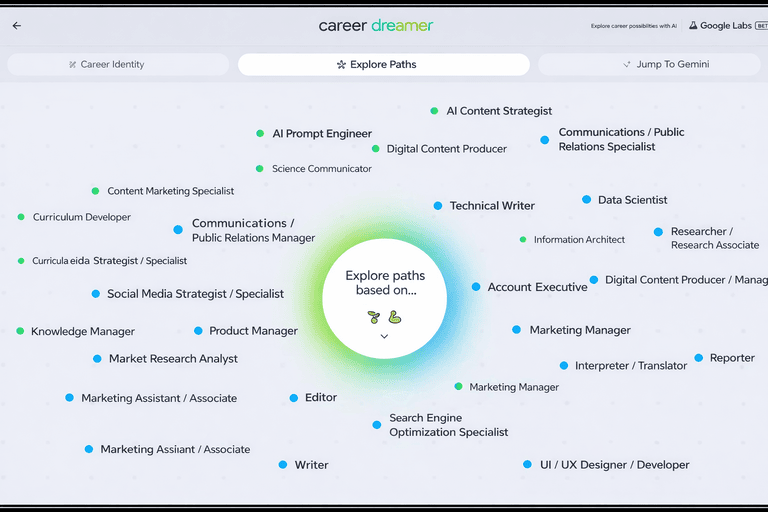
Thinking about a career change but not sure where to begin? This tutorial explains how to use Google’s Career Dreamer to explore different roles, understand why they fit you, and see what you might need to learn next.
Visit Career Dreamer
You can start using Career Dreamer at no cost. No account setup or sign-in is required, so you can explore right away without any friction.
Share Work Background
Begin by entering a current or past role. This gives the tool a basic understanding of where you are coming from professionally and sets the foundation.
Select Responsibilities and Skills
Career Dreamer will generate a list based on your role. You simply choose what applies to you.
This may include:
Key responsibilities you handled
Skills you regularly used
Areas where you have hands-on experience
Generate Career Identity Statement
Once you confirm your selections, Career Dreamer automatically drafts a Career Identity Statement. This acts as a summary of who you are professionally.
Explore Suggested Career Paths
Tap on Explore paths to see a list of potential career options. As you hover over each role, the tool explains why your background is a good match.
You will see:
A short description of the role
How your experience aligns with it
Why it could be a logical next step
Adjust Direction of Results
If you want to shift away from your current path, you can refine your results. Use the Explore paths based on option to control what the AI prioritizes.
Focus on Different Opportunities
You can customize the suggestions by adjusting what the AI considers most important.
For example:
Deselect Experiences and Education
Keep Skills and Interests selected
Use Jump to Gemini for Actions
Finally, Career Dreamer includes a Jump to Gemini tab. This feature helps you take action by assisting with resume building, drafting cover letters, or exploring even more job ideas based on your career goals.
Note: Be honest when selecting skills and responsibilities, even if they feel basic or informal.
Top AI & Tech News
Anthropic’s Claude Code is having a breakout moment with developers and hobbyists, stirring viral hype and spooking investors as AI-built “selfware” threatens traditional software stocks
Gartner projects global AI spending will hit $2.52T in 2026, up 44%, driven mainly by large infrastructure buildouts
South Korea is running an AI competition to boost local models, with LG, SK, and startup Upstage still in the race
The Information reported that OpenAI and Anthropic may go public by late 2026 or early 2027, with up to eight VC-backed startups already preparing for IPOs this year
AI Art Spotlight

Create Your Own Photo Like This Using the Prompt Below:
Present a clear, 45° top‑down isometric miniature 3D cartoon scene of a [STADIUM], with soft, refined textures, realistic PBR materials, and gentle, lifelike lighting. Use a clean, solid [COLOR] background. At the top center, display the name of the stadium in large, bold text, then directly beneath it show its actual seating capacity in medium text, and place the official logo associated with this stadium below the capacity. All text must automatically contrast with the background (white or black). The layout should be centered, with square 1080×1080 dimensions.Model: Nano Banana Pro
Prompt of the Day
Find Your Best AI Model with This Prompt
Use this prompt to find the best AI model for your task. Describe your goals, priorities, and any limits in plain language. The prompt asks the assistant to compare models by strengths like reasoning, creativity, speed, and cost. It then recommends top choices with short reasons and sample prompts. You get clear, practical model suggestions without technical jargon.
Top AI Video Tutorial
The 10% of AI Tools That Drive 90% of My Results
Want Weekly Creator Playbooks to Grow on Social?

Want to stand out and grow your social presence? Join 10K+ creators getting weekly playbooks to build a creator business that pays.
Unlock $10,000+ Worth of F-R-E-E Creator Blueprints, including: 👇
|
|