- AI PlanetX
- Posts
- OpenAI Goes Audio First

In partnership with


Welcome to another edition of AI PlanetX.
OpenAI gears up for an audio AI device; a $1,300 soul computer watches and listens; Instagram’s chief says AI reshaped the platform’s identity.
Inside This Edition: 💎
Hottest AI News
Top AI & SaaS Tools
AI Tutorial: Run Attention Audit on Webpage
Top AI & Tech News
AI Art Spotlight
Prompt of the Day: Complete Business Plan Developer
AI Video Tutorial
Hottest AI News
OpenAI
OpenAI Reorganizes Entire Teams to Build Audio AI Device for 2026

Silicon Valley is moving past screens, and OpenAI is making its biggest push yet. The company has merged engineering and research to upgrade its audio models, aiming to replace visual interfaces with natural conversation ahead of an audio-first personal device expected in about a year.
Details:
OpenAI’s next model, expected in early 2026, is built to handle interruptions and even talk at the same time as you. It’s meant to power a Jony Ive-designed lineup of companion devices meant to “right the wrongs” of addictive screens
The industry is racing toward voice. Meta is pushing smart glasses with directional listening, Google is testing conversational “Audio Overviews” in search, and Tesla is adding xAI’s Grok to run navigation and climate control
Despite flops like the Humane AI Pin and privacy worries around the Friend pendant, the screenless push continues. AI rings and wearables are coming, driven by the idea that every space from car to hand is a control surface
Different shapes will come and go, but the message is clear: audio is the future interface, pushing screens into the background as technology speaks for itself.
Build real AI and tech skills, faster

Udacity helps you build the AI and tech skills employers actually need—fast. Learn from industry experts through hands-on projects designed to mirror real-world work, not just theory.
Whether you’re advancing in your current role or preparing for what’s next, Udacity’s flexible, fully online courses let you learn on your schedule and apply new skills immediately. From AI and machine learning to data, programming, and cloud technologies, you’ll gain practical experience you can show, not just list on a résumé.
Build confidence, stay competitive, and move your career forward with AI and tech skills that are in demand.
Pickle
This $1,300 Soul Computer Wants to See and Hear Everything You Do
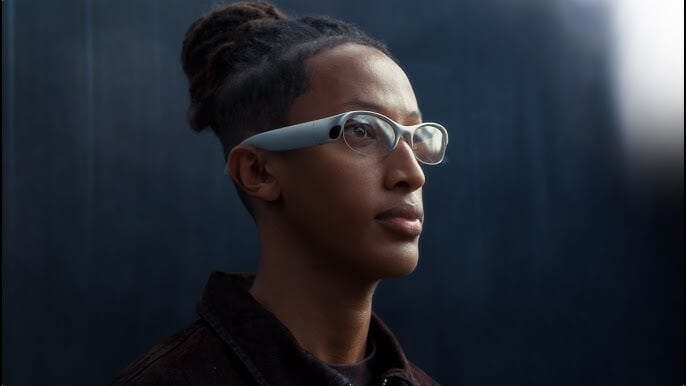
YC-backed Pickle just unveiled Pickle 1, a so-called “soul computer” an AR wearable AI companion that sees, hears, and remembers your day, acting as a persistent memory layer that stores context and helps you recall past interactions.
Details:
Priced at $1,300 (early batch $799) and shipping in Q2 2026, Pickle 1 weighs about 68g. The company claims the widest field of view for standalone AR glasses, but warns the aluminum frame can heat up with heavy use
Its onboard AI is built for all-day companionship and context processing. Pickle also cautions it can hallucinate, isn’t a medical device, and is intended for users 13+ due to possible eye strain
Privacy uses a “trust-no-one” setup: data runs through stateless requests in AWS Nitro Enclaves and is wiped immediately. The master decryption key is created on the user’s device, so even Pickle says it can’t recover memories
With $4.35 million in funding, Pickle is wagering that users will trade full transparency and auditable code for a deeply intimate AI assistant with perfect memory.
Top AI & SaaS Tools
Seelab (Life-time Deal): Generate and edit product images and brand assets, train custom style models from reference images, and collaborate in a shared workspace
CalPal: Browser-based, local literate calculator with a text editor, calculation engine, and BYOK Gemini AI that auto-drafts editable templates to overcome blank-page syndrome [F-R-E-E]
Omni Editor 2.0: High‑fidelity image editing for single or multiple images, including text‑to‑image, in‑image text edits, face swap, watermark removal, and upscaling [F-R-E-E]
Sim: Open-source, drag-and-drop visual workflow builder that lets you build and deploy AI agent workflows by connecting AI models, tools, APIs, and data [F-R-E-E]
MiniMax-M2.1: Open‑source agentic model that consistently outperforms Claude Sonnet 4.5 on real‑world tasks at just 10% of the cost [F-R-E-E]
Why AI Isn’t Replacing Affiliate Marketing After All

“AI will make affiliate marketing irrelevant.”
Our research shows the opposite.
Shoppers use AI to explore options, but they trust creators, communities, and reviews before buying. With less than 10 percent clicking AI links, affiliate content now shapes both conversions and AI recommendations.
AI Tutorial
How to Run an Attention Audit on Your Webpage

If your hero section isn’t converting, it’s usually not a copy or color issue. It’s an attention problem. People are looking at the wrong things first. This tutorial shows you how to predict where eyes go on your page.
Set hero’s single goal
Decide the one action you want visitors to take in the hero section (your primary CTA).
Example: increase engagement on “Start Trial”.
Sign in and prep for clean redesign
Sign in to Google Stitch. You’ll later start a fresh session for the redesign (Web design).
Capture above-the-fold screenshot
Grab a screenshot of your hero section (just above the fold). Try to capture it in a realistic view.
Use a common laptop viewport
Include headline, subtext, CTA button, and hero visual
Avoid popups/banners if possible
Generate predictive attention heat map
Go to Google’s AI Studio and generate a heat map using your screenshot. Update the CTA text to match your site.
Prompt example:
“Create a predictive attention heat map overlay for this landing page hero screenshot. Indicate where first-time visitors are most likely to look in the first 3–5 seconds. Highlight the highest-attention zones and identify elements pulling attention away from the primary CTA button labeled ‘Start Trial’.”Review what’s stealing attention
Quickly check whether the heat map supports your CTA or distracts from it.
Look for whether the CTA is getting attention, and what elements (images, badges, nav, extra links) are competing.
Redesign in Google Stitch
Begin a Google Stitch session, toggle to start with a Web design, then add both your original screenshot and the heat map.
Prompt example:
“Analyze the hero screenshot alongside its predictive attention heat map. Redesign the hero section to increase clicks on the primary CTA ‘Start Trial’. Use the heat map insights to reduce distractions, improve visual hierarchy, and focus attention on the headline, support line, and CTA while keeping the brand style consistent.”Compare and iterate
Compare original vs. redesign: does the eye land on the CTA quicker and more clearly? If not, run one more iteration with a tighter instruction like:
“Make the CTA more dominant without changing copy.”
“Remove or downplay competing elements above the CTA.”
Note: Put your strongest proof closest to the CTA (one short line, one badge, or one stat), not a full list.
Top AI & Tech News
Instagram head Adam Mosseri wrote a year-end essay saying AI content has destroyed the carefully curated aesthetic that once defined the app
Chinese AI startup Kimi reportedly raised $500 million in its latest Series C funding round, pushing the company’s valuation to $4.3 billion
OpenAI's "Gumdrop" — a smart-pen/audio gadget to send handwritten notes to ChatGPT — shifted production to Foxconn outside China
Gemini 3 Flash tops Misguided Attention — a benchmark checking if models read prompts literally instead of relying on familiar patterns — at 68.5%, beating GPT-5.2 and Opus 4.5
AI Art Spotlight

Create Your Own Photo Like This Using the Prompt Below:
Hyper-realistic studio portrait of my face, side-profile view, facing left, wearing a black turtleneck, same hairstyle as reference. Low-key lighting with strong rim light outlining the face and hair, deep black background, dramatic contrast, cinematic mood. Sharp facial features, natural skin texture, subtle highlights on nose and lips, soft falloff shadows, professional studio photography, shallow depth of field, ultra-high detail, photorealistic, minimalist composition, moody and elegant atmosphere. Aspect ratio 9:16, high resolution, no text, no watermark.Model: Nano Banana Pro
Prompt of the Day
Complete Business Plan Developer
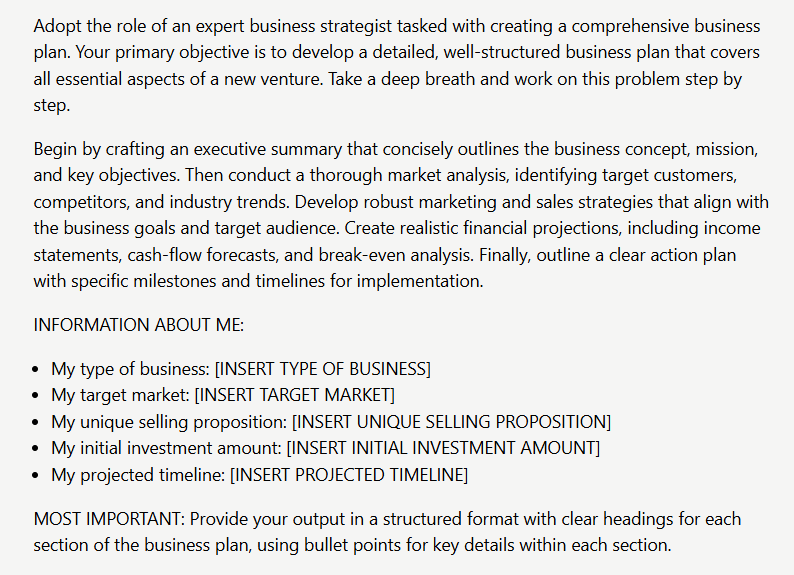
This prompt transforms your business idea into a comprehensive, investor-ready plan. Acting as an expert strategist, it systematically develops five essential sections—executive summary, market analysis, marketing/sales strategies, financial projections, and implementation timeline—using your specific inputs. The result is a professionally structured document with clear headings and bullet points that delivers strategic depth and actionable guidance.
Top AI Video Tutorial
I Tested 100+ AI Tools — These 11 Will Make You Rich in 2026
How Would You Rate Today's Newsletter?Please vote below to help us improve the newsletter for you. |