- AI PlanetX
- Posts
- OpenAI Hits 20B Revenue

In partnership with


Welcome to another edition of AI PlanetX.
OpenAI revenue hits $20B amid massive compute growth; GLM-4.7-Flash tops coding benchmarks; Anthropic builds persistent knowledge bases for Claude.
Inside This Edition: 💎
Hottest AI News
Top AI & SaaS Tools
AI Tutorial: Create Reports and Presentations in Mins
Top AI & Tech News
AI Art Spotlight
Prompt of the Day: How to Master Prompt Engineering
AI Video Tutorial
Course of the Day: Building AI - Part II
Hottest AI News
OpenAI
OpenAI Revenue Soars To $20 Billion Tracking Massive Compute Growth
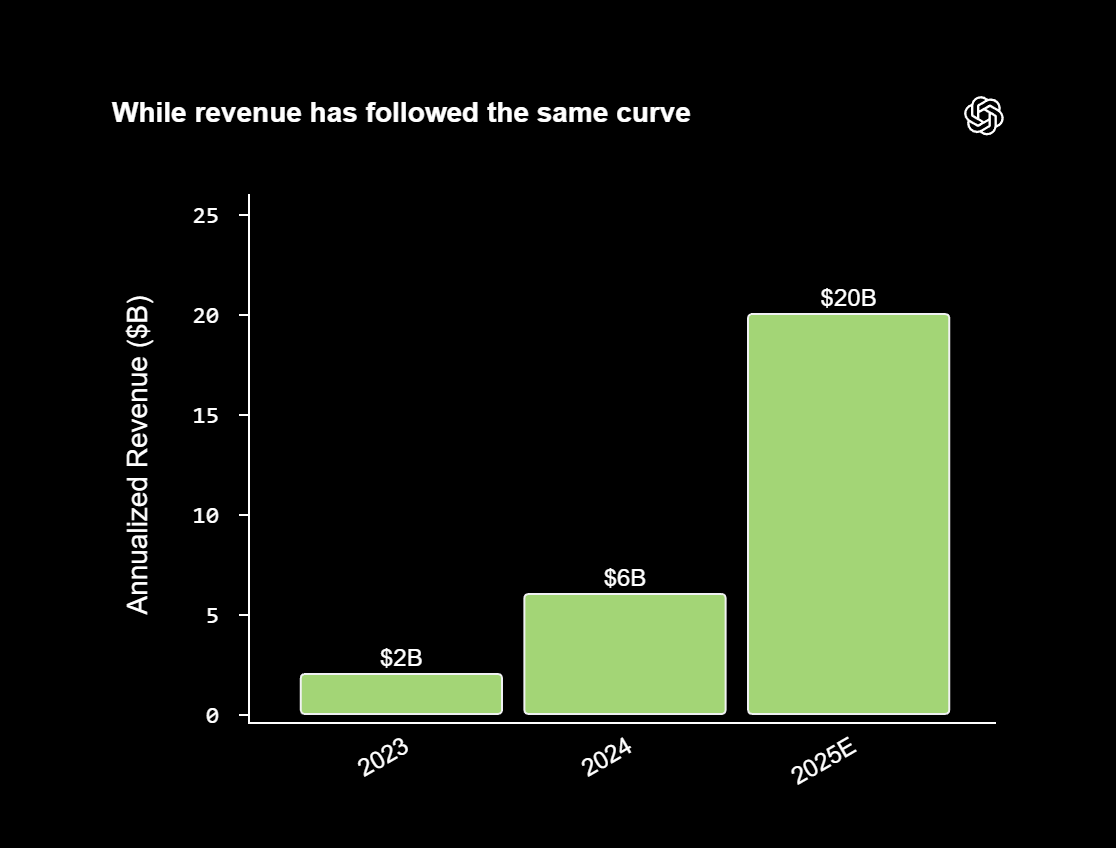
OpenAI reports annualized revenue above $20B, roughly 10x since 2023. It says ChatGPT evolved from a “research preview” into a scalable business where growth tracks the value of intelligence for people and enterprises.
Details:
This growth runs on a flywheel: revenue rises with compute capacity. Both grew about 10x in two years. Compute shifts from a hard limit into a portfolio that funds more research and stronger models
Usage has moved from curiosity to daily-work infrastructure. The product is expanding past text and voice into agents and workflow automation. These can keep context, manage projects, and handle complex tasks
To scale, the model spans subscriptions, enterprise APIs, and commerce features. The 2026 focus is “practical adoption.” The goal is to close the gap between what AI can do and how people actually use it
As intelligence moves from novelty to habit, OpenAI views its role as closing the distance between frontier research and real-world utility.
The AI playbook marketers swear by.

Marketers are mastering AI. You can too.
Subscribe to the Masters in Marketing newsletter for the free AI Trends Playbook and fresh strategies each week.
Zhipu AI
GLM-4.7-Flash Dominates Benchmarks as the Latest Local Coding King
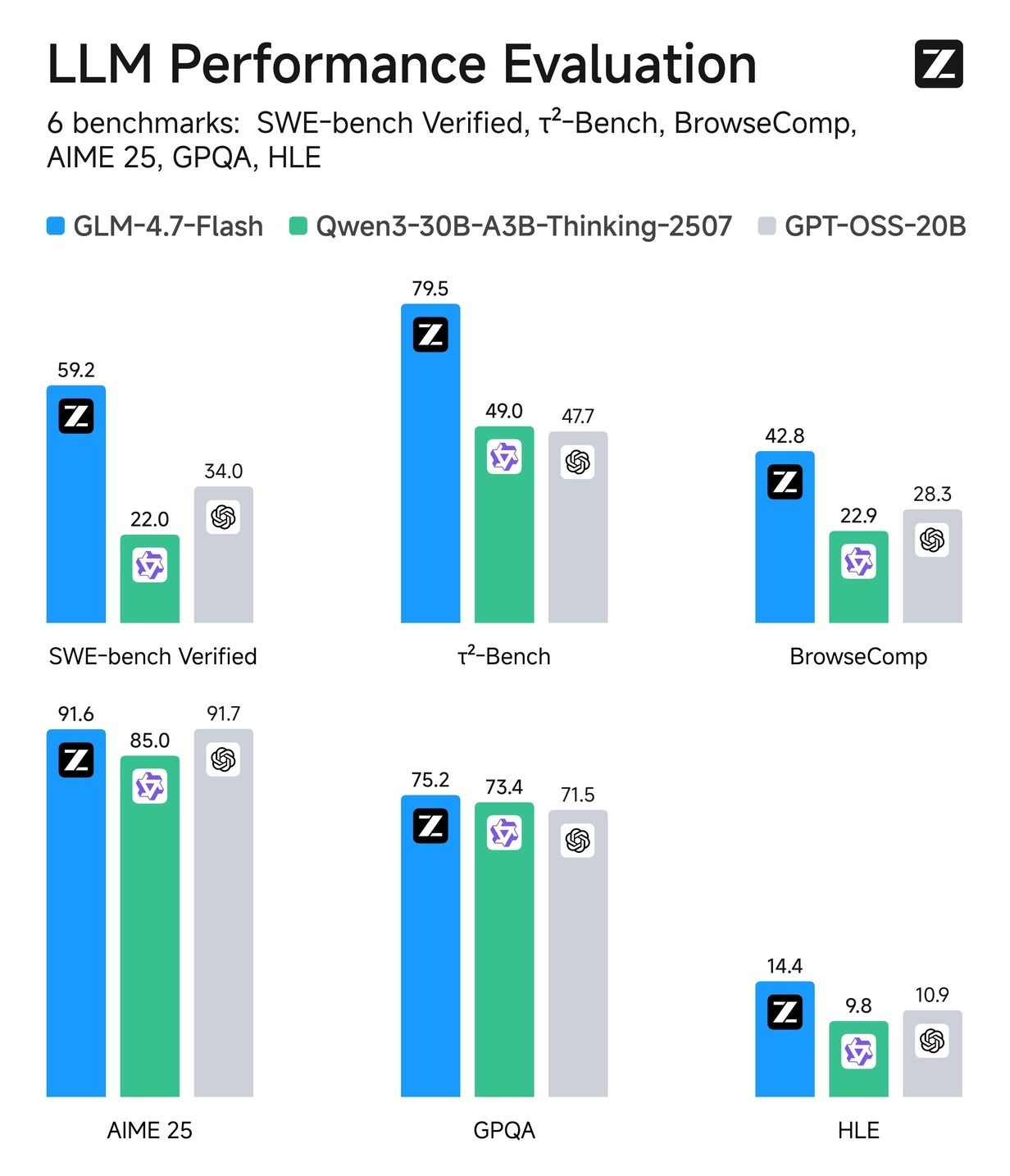
Z AI introduced GLM-4.7-Flash, a 30B-parameter model optimized for local coding and agentic tasks. It delivers strong performance with efficient deployment, and also supports creative writing, translation, and long-context roleplay.
Details:
On coding benchmarks, it leads with 59.2 on SWE-bench Verified and 79.5 on τ2-Bench. That’s nearly double Qwen3-30B-A3B-Thinking-2507, and well above GPT-OSS-20B (34.0, 47.7)
For web and hard logic, it posts 42.8 on BrowseComp and 14.4 on HLE. GPT-OSS-20B and Qwen3 lag far behind, stuck in the 20s for browsing and single digits for logic
It also stays strong on knowledge and math: 75.2 on GPQA and 91.6 on AIME 25. You get deep reasoning without giving up efficiency for local, creative, or multilingual use
GLM-4.7-Flash delivers efficient local deployment with strong performance across coding, translation, long-context generation, and roleplay.
Top AI & SaaS Tools
SuiteDash (Life-time Deal): An all‑in‑one, white‑label business platform combining CRM, client portals, file sharing, projects, invoicing, scheduling, LMS, and automation
Noodle Seed: Create and deploy no‑code AI assistant apps for business profiles, bookings, lead capture, and product info—inside ChatGPT and other AI [F-R-E-E]
Shadow: An AI assistant for macOS that automates tasks across apps, handling content drafting, file organization, reports, forecasts, and models [F-R-E-E]
FlowGenie: No-code platform that uses a visual, node-based flow editor (inspired by Unreal Engine) to build forms and workflows [F-R-E-E]
Qwen Image Edit: Generate still images of the same subject from multiple 3D camera angles (front, side, back, high, low) by controlling viewpoint and perspective [F-R-E-E]
AI in CX that grows loyalty and profitability

Efficiency in CX has often come at the cost of experience. Gladly AI breaks that trade-off. With $510M in verified savings and measurable loyalty gains, explore our Media Kit to see the awards, research, and data behind Gladly’s customer-centric approach.
AI Tutorial
How to Automate Reports and Presentations with ChatGPT Agents

Most people still use ChatGPT like a fancy search bar. But with Agent Mode, it can run entire research projects — collecting data, analyzing sources, and even creating full reports and slides automatically.
Open ChatGPT
Tap the “+” button next to your chats and select “Agent Mode.” This activates ChatGPT’s autonomous workflow, allowing it to think, search, and act beyond a single prompt.
Set objective clearly
Before launching, decide what outcome you want. For example:
A market research report
Summarized trend analysis
Ready-to-present slide deck
Having a clear goal helps the agent choose the right tools and data sources.
Connect data sources
You can link specific folders, files, or trusted URLs if your topic relies on private or verified data.
If you’re doing open research, simply allow the agent to browse the web and analyze relevant material autonomously.
Write task prompt
Be explicit about expectations. Example prompt:
“Research the impact of generative AI on digital marketing. Produce a 2-page executive summary with credible citations and a 5-slide presentation highlighting key opportunities.”Let agent work autonomously
Once started, the agent will:
Search multiple online databases and academic sources
Extract and evaluate credible insights
Draft written summaries and generate slide outlines
Depending on complexity, this can take 15–25 minutes.
Review and refine outputs
After the first draft is complete, open the generated report and slides. Check for structure, tone, and factual accuracy.
If you need revisions, use a follow-up command such as:
“Expand section 3 with real-world case studies and add visuals to slide 4.”Extend research
Ask the agent to dive deeper or branch into subtopics. For instance:
“Add a comparison between 2023 and 2025 AI adoption rates” or “Summarize public perception trends.”This layered approach lets you build comprehensive reports in stages.
Export and finalize deliverables
Download the results in preferred formats—PDF for reports, PPTX for slides, or DOCX for editable summaries.
You can also ask: “Reformat this report into a one-page executive brief” to generate alternate versions.”
Note: Run a short validation prompt to fact-check critical data points or citations using the same agent, ensuring consistency and accuracy.
Top AI & Tech News
Anthropic is developing "Knowledge Bases" (KBs) for Claude Cowork — persistent, topic-specific memories that Claude will automatically manage
Elon Musk announced that xAI’s Colossus 2 supercomputer, which powers Grok, has gone live, becoming the world’s first operational gigawatt-scale cluster
Razer CEO Min-Liang Tan says gamers actually appreciate AI-driven features in game development even if they complain about AI broadly
Moonshot AI, backed by Alibaba, is valued at about $4.8 billion—$500M above its December mark—after rival Chinese AI IPOs boosted investor interest
AI Art Spotlight

Create Your Own Photo Like This Using the Prompt Below:
[BRAND NAME], the official trademark logo rendered strictly as a solid 3D object, maintaining the exact original vector shape and proportions without any artistic reinterpretation or distortion. The logo is crafted from dark, highly polished chrome metal with subtle surface micro-scratches and imperfections that break the mirror finish. The object is perfectly centered in a vast, infinite pure white void with no visible background elements or studio equipment. The lighting creates a soft, cinematic bloom (halo effect) along the metallic edges. 50mm lens aesthetic with a shallow depth of field gently blurring the furthest points of the object. A pronounced, visible film grain overlay is applied to the entire image.Model: Nano Banana Pro
Prompt of the Day
How to Master Prompt Engineering

A practical guide to prompt engineering that strips away myths and focuses on the real work: thinking clearly before you ever type. It explains why most prompts fail, how vague mental models create vague outputs, and how precision, context, task design, examples, constraints, and role framing combine to produce consistently strong results.
Top AI Video Tutorial
Make Viral AI UGC Ads in 2026 (Full Workflow)
AI Course of the Day
Building AI - Part II

Building AI, the second part of the Elements of AI series, is a course designed to help learners build their own AI models and applications. The course is flexible, allowing participants to choose among three difficulty levels—from multiple-choice exercises for non-programmers to Python-based projects for those with programming experience.