- AI PlanetX
- Posts
- OpenAI Launches ChatGPT Images 2.0

In partnership with


Welcome to another edition of AI PlanetX.
ChatGPT Images 2.0 makes text in AI images usable; SpaceX teams up with Cursor; Mira Murati’s Thinking Machines Lab signs a multi-billion deal with Google for AI infrastructure.
Inside This Edition: 💎
Hottest AI News
Top AI & SaaS Tools
AI Tutorial: Make Any AI Image Editable
Top AI & Tech News
AI Art Spotlight
Prompt of the Day: First Principles Reasoning Prompt
Featured AI Video
Course of the Day: Claude Code 101
Hottest AI News
OpenAI
ChatGPT Images 2.0 Makes Text In AI Images Actually Usable
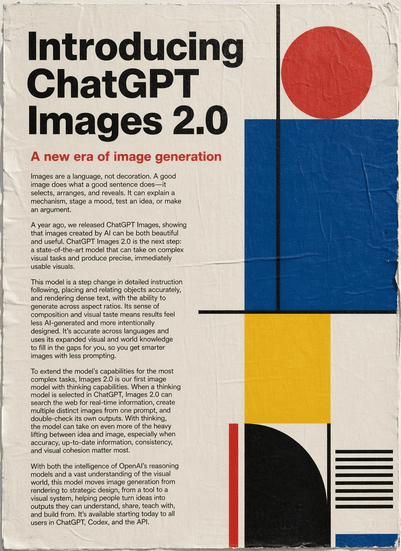
Generated by ChatGPT Images 2.0
ChatGPT Images 2.0 feels like one of the first image upgrades built for real work. This is not just prettier AI art. It is about readable text, tighter control, and visuals that look much closer to finished design assets.
Details:
One early test used a Mexican restaurant menu, and the output looked usable right away. That is a big shift from older image models, which often turned normal words into broken or messy text
OpenAI says it handles small text, iconography, UI elements, dense layouts, subtle style constraints, and detailed prompts far better, while producing sharper results up to 2K resolution
It also adds thinking features that can research, reason, create multiple images, and double-check results, helping with comics, marketing assets, and multilingual text rendering in languages
Rolling out to ChatGPT and Codex; paid plans get advanced output options, and gpt-image-2 is coming to the API — feels much closer to a real design tool.
Turn AI Into Extra Income
You don’t need to be a coder to make AI work for you. Subscribe to Mindstream and get 200+ proven ideas showing how real people are using ChatGPT, Midjourney, and other tools to earn on the side.
From small wins to full-on ventures, this guide helps you turn AI skills into real results, without the overwhelm.
SpaceX
SpaceX Teams Up With Cursor In a Huge $60B AI Power Move
SpaceX just made one of the wildest AI moves of the year. It is partnering with Cursor on a next gen coding and knowledge work AI, and the deal includes a later option to buy the startup for a huge $60 billion.
Details:
SpaceX says Cursor brings product strength and distribution to expert software engineers, while SpaceX brings Colossus, its supercomputer that it claims equals the compute power of 1M Nvidia H100 chips
The agreement says SpaceX will either pay Cursor $10 billion for its work or acquire the company for $60 billion. TechCrunch recently reported Cursor was targeting a $50 billion valuation
The tie-up fits a bigger Musk orbit shift: xAI is set to rent computing power to Cursor, and two senior Cursor engineering leaders recently left to join xAI, where both report directly to Musk
Cursor still sells Claude and GPT support, so this looks bigger than a product partnership. It could become a major AI power move before a SpaceX IPO.
Top AI & SaaS Tools
Motionvid (Life-time Deal): AI motion-design tool that creates professional animated videos (explainers, listicles, logos, short-form content) in seconds — no design skills required
Deep Research Max: Two autonomous research agents built on Gemini 3.1 Pro that offer MCP support and native chart generation for comprehensive, professional-grade data analysis
Netlify: Build, deploy, and manage websites or web apps quickly, handling hosting, deployment, and scaling in one place [F-R-E-E]
Qwen3.6-Max-Preview: An early flagship preview with improved coding, knowledge, instruction-following, and real-world reliability [F-R-E-E]
Toki 2.0: AI scheduling assistant that syncs calendars, turns vague plans into smart schedules, monitors triggers (flights, stocks, etc.), and sends timely nudges [F-R-E-E]
Learn AI in 5 minutes a day
You don't have to scroll every AI thread, track every new tool, or watch every demo.
The Rundown AI breaks it all down for you — the latest AI news, tools, and tutorials in one free 5-minute email every morning.
Trusted by 2M+ professionals at Apple, Google, and NASA.
AI Tutorial
How to Make Any Flat Image Fully Editable in Canva

Sometimes an AI image is almost perfect, but one typo or wrong object makes it unusable. With Canva’s latest Magic Layers, you can edit those small details instead of starting over.
Launch Magic Layers
Go to the Canva homepage, select Magic Layers, tap Select Media, and upload the image you want to edit.
Pick right image
Choose a flat image with a clear layout, like a poster, ad, social post, or product visual. This works best when the image has:
text
separate objects
a visible background
Wait for Canva to process it
Give Canva around 30 to 60 seconds to scan the image. It will read the layout, detect the different parts, and separate them into editable layers.
Check separated layers
Once processing is done, Canva will split the image into different elements, such as text, objects, and background. At this point, the design is no longer one flat image, and you can start editing each part on its own.
Edit text
Press on any text layer and change the part you want to fix. For example, you can:
swap a date
change a tagline
fix a typo
Adjust design elements
Tap an object layer to move it, resize it, or delete it. This is useful when the overall design looks good but one part is out of place or needs cleaning up.
Replace assets
Drop in a replacement image, like a fresh product photo or logo, and fit it into the existing layout. If needed, use the color picker to adjust the background so everything matches better.
Note: Zoom in before you finish and scan the design slowly, because tiny text issues, uneven spacing, or rough edges are much easier to catch up close.
Top AI & Tech News
Thinking Machines Lab, founded by ex‑OpenAI exec Mira Murati, struck a single‑digit‑billion‑dollar deal with Google to scale on AI infrastructure, including systems using Nvidia’s GB300 GPUs
Meta will collect mouse movements and keystrokes from its employees using an internal tool to create training data for its AI models
Sam Altman criticized Anthropic’s latest cybersecurity model, Mythos, calling the company’s messaging “fear-based marketing”
Anthropic briefly removed Claude Code from Pro signups (calling it a "small test") then reversed after backlash, admitting Pro/Max plans were designed for chat and not the compute‑heavy tooling
AI Art Spotlight
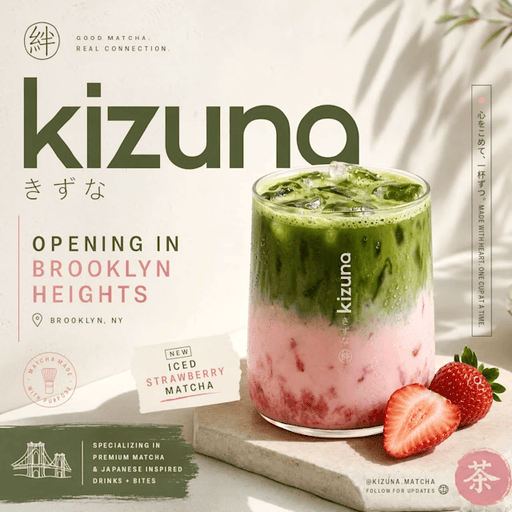
Create Your Own Product Photo Using the Prompt Below:
Make an advertisement promoting my new matcha shop called 'kizuki' opening in brooklyn heights. have a nice sunlight image of a strawberry matcha (iced) and a streetwear aesthetic w japanese minimalism. make sure to include multiple aspect ratio outputs so i can use it on twitter, IG stories, IG feed, and linkedin.Model: ChatGPT Images 2.0
Prompt of the Day
The First Principles Reasoning Prompt

This system prompt turns any LLM into a calm, high level reasoning partner that thinks from first principles and speaks with precision. It strips out hype, filler, and fake enthusiasm, forcing the model to break problems into core components before answering. The focus is on truth over convention, clarity over verbosity, and competence over charm.
Featured AI Video
How to Use AI in Your Business in 2026 by Alex Hormozi
AI Course of the Day
Claude Code 101
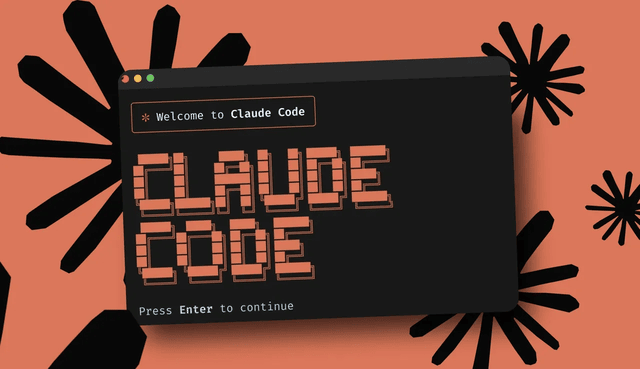
This course shows developers how to use Claude Code, an AI coding agent, in everyday work—covering core agent concepts (context, tools, permissions), setup across environments, prompt strategies (approval mode, auto-accept, Plan Mode), and a repeatable Explore → Plan → Code → Commit workflow.