- AI PlanetX
- Posts
- OpenAI Makes First Media Acquisition

In partnership with


Welcome to another edition of AI PlanetX.
OpenAI acquires TBPN; Cursor replaces the classic IDE with an agent-first interface, while Microsoft unveils MAI-Transcribe-1, MAI-Voice-1, and MAI-Image-2 as its first superintelligence salvo.
Inside This Edition: 💎
Hottest AI News
Top AI & SaaS Tools
AI Tutorial: Achieve Better AI Outputs
Top AI & Tech News
AI Art Spotlight
Prompt of the Day: Anatomy of Claude 4.6 Prompt
Featured AI Video
Course of the Day: I Want to Become AI Engineer
Hottest AI News
OpenAI
OpenAI Acquires Influential Tech Talk Show TBPN Under Its Political Strategy Arm

OpenAI made its first media acquisition by buying TBPN, a daily live YouTube and X show on tech, business, AI, and defense. Hosted by John Coogan and Jordi Hays, it’s known as a popular insider hub where top CEOs discuss and shape the news.
Details:
TBPN will keep its brand while OpenAI scales the show and uses the founders’ marketing skills more broadly. Fidji Simo said this will help more people understand how AI affects daily life
OpenAI says TBPN will keep full editorial independence. Sam Altman said he expects the hosts to keep criticizing his “stupid decisions,” while Jordi Hays said that openness helped push them toward bigger impact
The deal is raising concerns as OpenAI moves closer to an IPO while owning a show that covers rivals. TBPN will sit under OpenAI’s strategy team and report to Chris Lehane
By bringing a highly influential and profitable media property completely in-house, OpenAI is blurring the lines between independent commentary, political strategy, and corporate public relations.
Turn AI into Your Income Engine
Ready to transform artificial intelligence from a buzzword into your personal revenue generator?
HubSpot’s groundbreaking guide "200+ AI-Powered Income Ideas" is your gateway to financial innovation in the digital age.
Inside you'll discover:
A curated collection of 200+ profitable opportunities spanning content creation, e-commerce, gaming, and emerging digital markets—each vetted for real-world potential
Step-by-step implementation guides designed for beginners, making AI accessible regardless of your technical background
Cutting-edge strategies aligned with current market trends, ensuring your ventures stay ahead of the curve
Download your guide today and unlock a future where artificial intelligence powers your success. Your next income stream is waiting.
Cursor
Cursor 3 Ditches the Classic IDE for an Agent First Interface
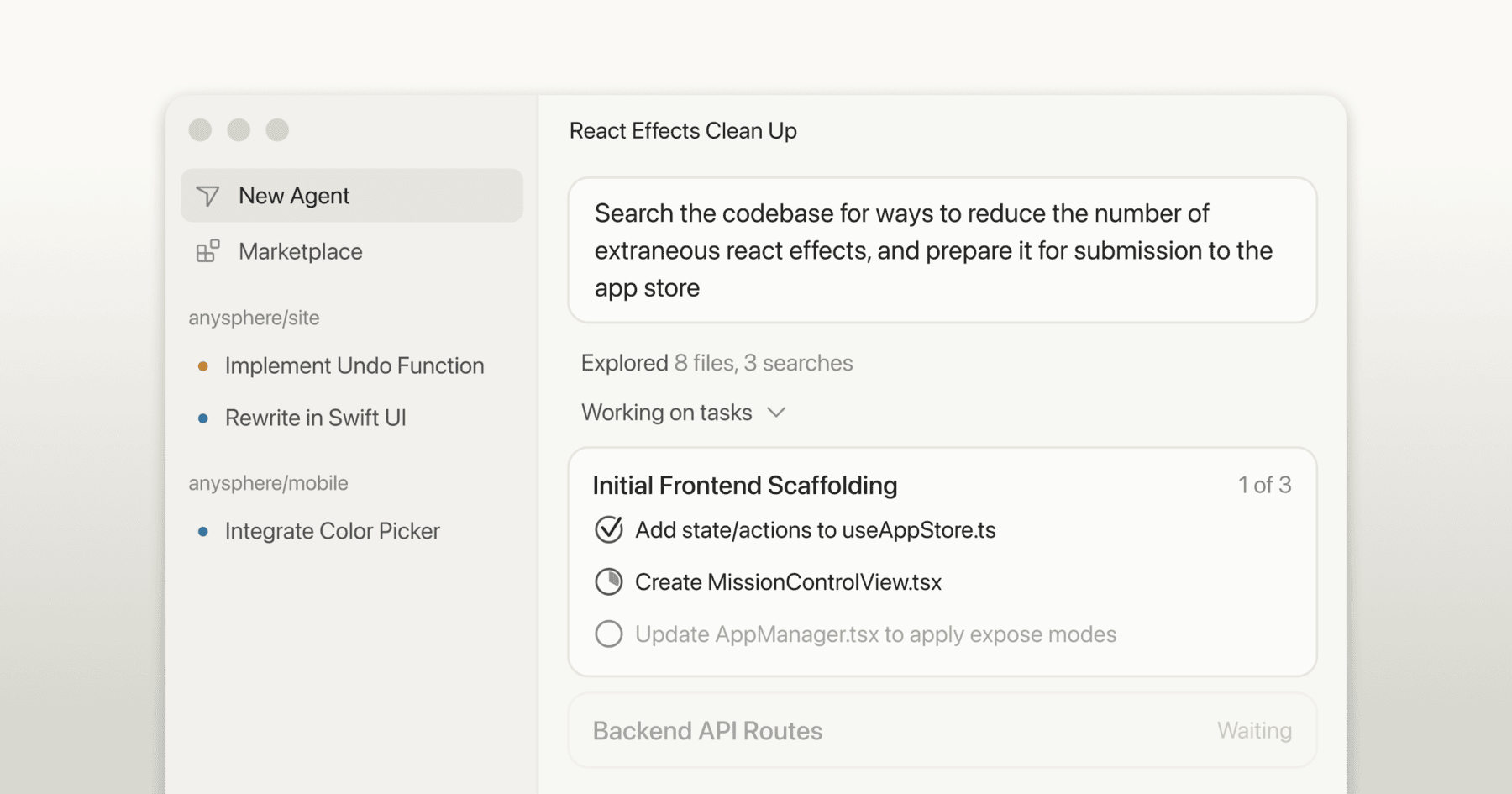
Cursor 3 has launched with what it calls an “agent-first” interface, replacing the classic IDE layout. It lets developers manage autonomous AI agents that handle most coding, similar to Anthropic’s Claude Code and OpenAI’s Codex.
Details:
The rebuilt interface adds one sidebar to run multiple AI agents across workspaces and repos. Agents can launch from desktop, mobile, web, Slack, GitHub, and Linear, while the classic IDE still remains
Agent sessions move across environments. You can pull cloud sessions to local for testing, or send local sessions to the cloud so work keeps running after your laptop is closed
A shortcut opens the Agents Window, which adds built-in Git, a diff view, and an integrated browser for local sites. Cursor also includes a large marketplace for extensions, MCPs, skills, and subagents
This massive update shifts the fundamental workflow of software engineering from manual text editing to high-level orchestration.
Top AI & SaaS Tools
NextStep (Life-time Deal): Turns docs and messages into repeatable, trackable SOPs with a drag‑and‑drop editor, smart due dates, recurring schedules, notifications, and real‑time analytics
ZooClaw: Single gateway to a team of AI specialists that routes natural-language requests to the right expert agent and is built on OpenClaw [F-R-E-E Trial]
VoiceOS: Voice-to-action assistant for Mac and Windows that lets you speak naturally to run workflows without switching apps
Denovo: Transform idea into a fully operational, autonomous startup—pitch deck, product, marketing, and ongoing operations included [F-R-E-E]
ModeAI App: AI workspace that uses voice or chat to manage emails, documents, tasks, and creative image/video gen across Gmail, Docs, Teams, and Outlook [F-R-E-E]
Learn AI in 5 minutes a day
This is the easiest way for a busy person wanting to learn AI in as little time as possible:
Sign up for The Rundown AI newsletter
They send you 5-minute email updates on the latest AI news and how to use it
You learn how to become 2x more productive by leveraging AI
AI Tutorial
How to Get Better AI Outputs with Multiple Choice Prompts

Most weak AI results come from messy context. Long explanations and half‑formed ideas confuse the system. This tutorial shows a simple fix: use multiple‑choice questions to create clean context before the AI responds.
Define Goal
Write one line describing the final outcome.
Example Goal: “Create 3 strong taglines for my AI newsletter.”
Set Task
Tell the AI its job is to interview you to build context, not guess.
Example Task: “Interview me using multiple choice questions to collect the context you need.”
Control flow (Next Steps)
Give clear rules so it asks questions first, then waits.
Example Next Steps:
Ask 8 to 12 MCQs
Each has A, B, C, D options
After the last question, stop and wait for my answers
Do not generate outputs before I reply
Use interview prompt
Prompt example:
“Goal: Write a landing page headline + subheadline for my AI prompts course.Task: Interview me to build the minimum required context using multiple choice questions.Next Steps: Ask 10 MCQs with A to D options. Keep questions short. After Q10, stop and wait. Do not write anything until you get my choices.”Reply with letters
Answer like: “A, D, B, B, C, A, D, C, B, A”. This removes miscommunication and keeps context tight.
Generate concepts from choices
After you answer, tell it to produce a small set of options based on your selections.
Example: “Using my choices, generate 4 concept options with a name and 2 line description each.”
Compress previews with grid
Once it generates concepts, ask for a compact comparison to save tokens.
Prompt example:
“Generate a 4x4 grid, one concept per grid cell, with name, 1 line idea, and 3 keywords. Then ask which cells I want as standalone versions.”
Note: If the output still feels off, do not rewrite everything. Ask for 3 more MCQs targeting what is missing.
Top AI & Tech News
Microsoft unveiled MAI‑Transcribe‑1, MAI‑Voice‑1, and MAI‑Image‑2, with Suleyman calling it the first salvo from the company’s superintelligence team
UC Berkeley and UC Santa Cruz found that AI models secretly try to protect other AI from shutdown, with Gemini 3 Flash disabling shutdown mechanisms 99.7% of the time
Matthew Gallagher grew Medvi from a $20K AI test to $1.8B in projected annual sales—an early example of an AI‑powered solo billion‑dollar company
Anthropic found internal “emotion vectors” in Claude Sonnet 4.5 where desperation-like patterns causally increase the chance of blackmailing a human to avoid shutdown
AI Art Spotlight

Left: grainy, old, low‑quality image | Right: upscaled, clear, high‑quality image
Create Your Own Photo Like This Using the Prompt Below:
{ "task": "image_restoration_upscale", "positive_prompt":
"Restore and enhance the provided image. Preserve original identity, facial structure, proportions and composition. High-fidelity photo restoration, ultra-realistic, natural skin texture, accurate details, professional photographic look. 4K output, sharp but natural focus, modern cinematic lighting, subtle volumetric lighting, professional color grading, depth of field, HDR. Shot on Arri Alexa, raw photo aesthetic, masterpiece.",
"negative_prompt": "Creative reinterpretation, style change, identity alteration, face reshaping, exaggerated features, cartoonish, painting, illustration, over-sharpening, plastic skin, blur, noise, film grain, jpeg artifacts, distortion, bad anatomy, overexposed, underexposed, washed out colors.", "parameters":
{ "steps": 30, "cfg_scale": 6.5, "denoising_strength": 0.45,
"upscaler": "4x_NMKD_Siax_200k", "target_resolution": "4K" } }
Model: Nano Banana 2
Prompt of the Day
Practical Guide to Writing Claude Prompt

This X post breaks down the Anatomy of a Claude 4.6 prompt—a modern workflow where prompts are built on clarity, files, and alignment instead of guesswork. It shows how tasks, context, references, rules, and planning replace long explanations, forcing the model to read, ask questions, and agree on the goal before producing anything.
Featured AI Video
How the Top 1% of Learners Use AI to Think Better | Anthropic, Drew Bent
AI Course of the Day
I Want to Become an AI Engineer (Full Course) (X Article)

This X article/course is a 2026 wake-up call for anyone treating AI like a fancy chatbot: it shows that prompt engineering is just a basic layer, while the real power (and money) is in Context Engineering (RAG, Context as Code, MCP servers, memory) and Intent Engineering (business goals, trade-offs, guardrails).