- AI PlanetX
- Posts
- Tokyo Firm Builds World’s First AGI

In partnership with


Welcome to another edition of AI PlanetX.
Tokyo firm claims world’s first AGI; Figma launches AI object removal and image extension; OpenAI appoints Slack CEO Denise Dresser as Chief Revenue Officer.
Inside This Edition: 💎
Hottest AI News
Top AI & SaaS Tools
AI Tutorial: Use ChatGPT Agent to Save Money
Top AI & Tech News
AI Art Spotlight
Prompt of the Day: Prompt for Stunning VEO 3.1 Videos
AI Video Tutorial
Course of the Day: Context Engineering by Google
Hottest AI News
Integral AI
Tokyo Firm Claims to Have Built World’s First AGI System

A Tokyo firm founded by former Google leader Jad Tarifi says it has created the world’s first AGI by modeling its architecture on the human neocortex, pushing far past the limits of current AI technology.
Details:
The company defines AGI through three qualifiers: it must teach itself various skills without datasets or human help, avoid catastrophic risks while mastering tasks, and run with energy efficiency similar to a human
Engineers applied this framework to build a system that passed robot trials where machines learned skills without supervision, tapping Japan’s robotics strength to pursue what they call embodied superintelligence
Though they admit “world first” claims often draw skepticism like past quantum supremacy debates, they argue this early stage model marks a fresh chapter by introducing a system they believe can think and perceive
Whether Integral AI has really achieved AGI is uncertain, yet the company maintains it represents a historic milestone for greater freedom and collective agency.
Turn AI Into Extra Income

You don’t need to be a coder to make AI work for you. Subscribe to Mindstream and get 200+ proven ideas showing how real people are using ChatGPT, Midjourney, and other tools to earn on the side.
From small wins to full-on ventures, this guide helps you turn AI skills into real results, without the overwhelm.
Figma
Figma Launches AI-Powered Object Removal and Image Extension

Figma has officially launched a suite of AI-powered image editing features, aiming to save designers the hassle of exporting assets to other tools by offering granular editing capabilities directly within the platform.
Details:
The update adds a better lasso tool that lets users select, isolate, remove, or move objects while keeping the background intact, plus controls for lighting, shadows, color, and focus without using text prompts
To rival generators like Nano Banana, Figma introduced image expansion for resizing creatives and merged all editing tools into a single toolbar, giving background removal a prime position
Though Adobe and Canva have offered similar features for years, Figma Design and Draw include them as well, with a full rollout coming next year and launching the same day Adobe brought its tools to ChatGPT
It’s unclear whether these functions will roll out through Figma’s OpenAI partnership, but the update is a major move toward industry‑standard seamless design workflows.
Top AI & SaaS Tools
Black Friday AI Bundle (Life-time Deal): This AppSumo AI bundle gives you a 1‑year subscription to Bolt, Emergent, Pica, Hostinger, and Reclaim for just $69 [Combined value of over $1,260]
Nano Banana Pro "Context": KREA’s Nano Banana Pro lets users upload images and pick which parts (like style or objects) the model should copy and use as guidance, similar to a system prompt
Incredible: An always‑on AI agent that automates daily tasks with near‑zero hallucinations, large memory, and hundreds of integrations [F-R-E-E]
Doppl App: Google updated it with a personalized fashion feed, shop links, and saveable collections to help you discover, visualize, and buy outfits (Available in US) [F-R-E-E]
Qwen Code: Recent updates include stream‑JSON I/O, a 3‑tier adapter/session system, and full EN/CN internationalization with extensible language packs [F-R-E-E]
Free, private email that puts your privacy first

Proton Mail’s free plan keeps your inbox private and secure—no ads, no data mining. Built by privacy experts, it gives you real protection with no strings attached.
AI Tutorial
How to Use ChatGPT Agent Mode to Save Money Automatically

If you’ve ever wished someone could watch your spending and flag cheaper options automatically, Agent Mode gets you close. It turns ChatGPT into a mini assistant that helps you avoid waste.
Turn on Agent Mode
Launch ChatGPT, tap the "+" icon, and enable "Agent mode." This lets the AI take small, useful actions to help you save money.
Set simple saving rules
Give your agent clear targets so it knows what to optimize:
Budget for takeout
Weekly gas limit
Subscriptions you must keep
Example:
"Help me cut my monthly spending on food, gas, and subscriptions by around 15%."Find cheaper meals
Ask your agent to compare delivery and pickup deals, bundles, and low fee options across nearby restaurants.
Example:
"Compare takeout deals for burgers and rice bowls. Show 3 options under 22 dollars total."Reduce fuel spending
Share your ZIP code so the agent can check live gas prices and suggest the cheapest stations on your route.
Example:
"Using prices near 30303, list 5 cheap gas stations within 12 miles that fit my work commute."Catch unused subscriptions
Have the agent scan your inbox for recurring billing and upcoming renewals so you can cancel wasteful charges.
Example:
"Scan my email for subscription renewals and create a list with service, date, and monthly cost."Swap pricey outings
Let your agent find affordable events, workshops, or family activities in your area.
Example:
"Find 6 fun things to do this weekend within 25 minutes of me that cost 15 dollars or less."Auto check promo codes
Ask your agent to search for active discount codes, cashback, or rewards before you complete a purchase.
Example:
"Before I buy from Best Buy, find valid promo codes and any cashback offers I can apply."Get weekly savings recap
Ask the agent to track your wins and summarize how much you saved across food, gas, subscriptions, and promos.
Example:
"Every Sunday, give me a simple table showing how much I saved in each category."
Note: Share your usual driving routes so fuel price checks stay accurate and personalized.
Top AI & Tech News
OpenAI has appointed Denise Dresser, currently CEO of Slack, as Chief Revenue Officer to lead revenue strategy and customer success
Microsoft open-sourced GigaTIME, an AI model that pulls thousands of dollars’ worth of tumor insights from a $10 tissue slide
ByteDance and Alibaba have expressed interest in buying Nvidia's H200 AI chips after President Trump said exports to China could be allowed
Meta may release a next-generation frontier model codenamed “Avocado” in Q1 2026, which could be proprietary rather than open source
AI Art Spotlight
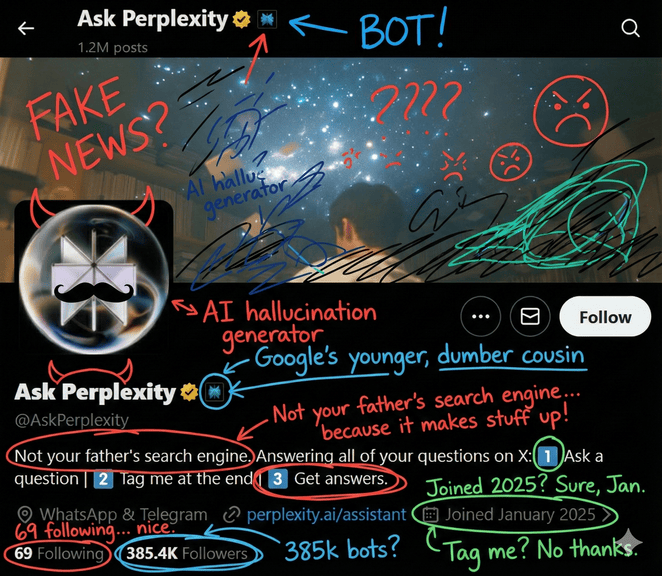
Upload a screenshot of your profile to Gemini and use the prompt below to roast your pic in a chaotic doodle style:
Cover the image with energetic roast scribbles, crisp mixed-color ink doodles, and cheeky handwritten remarks — chaotic but still clean and legible.Model: Nano Banana Pro
Prompt of the Day
Visionary Prompt for Stunning VEO 3.1 Videos
This turns AI into a creative director that, through a short conversation, uncovers the core concept, emotion, visual style, key beats, and camera motion for VEO 3.1 videos, then synthesizes a clear brief with distinct visual identity and unique touches, and finally outputs a copy‑paste‑ready, ultra‑detailed VEO 3.1 JSON prompt plus a short explanation of how each choice strengthens the creator’s vision.
Top AI Video Tutorial
5 INSANE Ways to Use Nano Banana for Architecture and Interior Design
AI Course of the Day
Context Engineering: Sessions & Memory by Google

This course gives you a practical understanding of how modern AI agents become stateful, personalized, and intelligent through Context Engineering. You’ll learn how Sessions, Memory, and dynamic context assembly work under the hood, how LLMs build long-term knowledge, and how to design agents that remember user preferences, handle long conversations, and make better decisions over time.